Empowering the Next Generation of Women in Audio

Join Us

Missed this Week’s Top Stories? Read our Quick Round-up!

It’s easy to miss the SoundGirls news and blogs, so we have put together a round-up of the blogs, articles, and news from the past week. You can keep up to date and read more at SoundGirls.org

October Feature Profile

First to Record Elvis – Marion Keisker


SoundGirls Panel – Career Paths in Film & TV at Sony Studios


The Blogs

SoundGirls at Mix Sound for Film

Live Digital Audio Part 3


SoundGirls News

Sexual Harassment Seminar

https://soundgirls.org/event/orlando-soundgirls-social-4/?instance_id=1388

SoundGirls Launches Initiative for Members Working in Production Sound

GIRLSCHOOL 2019

https://soundgirls.org/namm-2019-badges-for-soundgirls-members-2/

NAMM Mentoring Session 2019

She Rocks at NAMM Ticket Orders

Shadowing/Mentoring/Internship Opportunities

Los Angeles Monthly Shadowing Opportunity

https://soundgirls.org/shadowing-opportunity-brad-madix-and-annette-guilfoyle/

Shadow Beth O’Leary ME Tech on Kylie Minogue

Shadowing Opportunity w/ FOH Engineer Sean “Sully” Sullivan

Shadowing Opportunity w/ ME Aaron Foye

https://soundgirls.org/soundgirls-mentoring/


Round Up From the Internet

The producer’s handbook to mixing audio stories

Red Bull Studios’ #NormalNotNovelty to receive Campaign Award at 2018 Pro Sound Awards


SoundGirls Resources

Directory of Women in Professional Audio and Production

This directory provides a listing of women in disciplines industry-wide for networking and hiring. It’s free – add your name, upload your resume, and share with your colleagues across the industry.

SoundGirls – Gaston-Bird Travel Fund

Letter for Trades and Manufacturers


Women-Owned Businesses

SoundGirls Scholarships 2021 Now Open

Events

Sexual Harassment

https://soundgirls.org/about-us/soundgirls-chapters/

Jobs and Internships

Women in the Professional Audio

Member Benefits

GIRLSCHOOL 2019

 GIRLSCHOOL is a Celebration of Females Challenging the Status Quo.


With a production crew of all-women sound engineers, production designers, and lighting designers GIRLSCHOOL 2018 Festival featured; Shirley Manson + The Girlschool Choir, Jay Som, Kristin Kontrol + Special Guests, Moon Honey, Amber Coffman, Boyfriend, FAARROW, Lauren Ruth Ward, Marian Mereba, Soccer Mommy, Low Leaf, Akua, Pinky Pinky, A.W., Mary Lattimore, Nick + Navi, Drum & Lace, Desi Mo, Chelsea Jade, and Polartropica. DJ sets by Zuri Adia, Rituals of Mine, and Kim + The Created.

GIRLSCHOOL 2019 will take place on Feb. 1 – 2 in Los Angeles (venue tba). The festival will showcase over 20 bands, across two stages. Proceeds will benefit a girl-positive 501(c)3.

GIRLSCHOOL and SoundGirls mission is to create opportunities for women in the music industry.  We invite SoundGirls to be involved – all positions are volunteer only.

If you would like to be involved – please apply here  –

We look forward to working with Anna and GIRLSCHOOL to make this Festival a success. You can view photos from GIRLSCHOOL 2017 here GIRLSCHOOL – Three days of music and workshops in Los Angeles


GIRLSCHOOL is a music festival that celebrates women-identified-fronted bands and women artists.

Los Angeles Monthly Shadowing Opportunity

Sofar Sounds is a global organization that puts on shows in secret locations all around the world, offering musicians and audience members alike to experience live music in its most intimate form.

This is an opportunity to shadow the LA branch’s head of audio Evelyn Cools and learn what it takes to run audio at a show like this – load in, setup, sound/line checks, artist interaction, live mixing, time management, break down, etc. Evelyn will be offering this shadowing opportunity once a month for the next few months, starting off with a mid-November gig.

This month’s show will be on the 16th of November in the Arts District downtown and is in collaboration with NextVR (who will be streaming the whole show in virtual reality). Load in is at 6:30 pm and the night is expected to end around 10:45 pm. Sofar Sounds is currently not hiring new engineers; however, this shadowing opportunity offers definite potential for engineers to move forward with us in the future.

If you are interested, please send cover letter and resume to soundgirls@soundgirls.org


SoundGirls at Mix Sound for Film

Every year in the fall Mix Magazine presents a Sound For Film and TV conference.  Hosted at Sony Pictures Studios lot in Culver City, California, it is a congruence of the many different facets of film and television sound.  This year SoundGirls had a good showing, there was an energetic group of volunteers that braved the morning rain to register and greet the attendees. SoundGirls were attendees and even presenters.

New member Kristina Morss was excited about the wide variety of panels.  She lamented that the Animation and First Man panels were at the same time, which meant she could not go to both.  Coming from a video editing background, Kristina wanted to learn more about the sound side of post-production.  She had heard of the event from the Soundworks Collection, which also records some of the panels and hosts them on their website.

I too struggled to narrow my itinerary. Beginning with the keynote Scott Gershin, who focused on the possibilities of immersive sound, I made sure to see a sampler of different sound niches.  The Parade of Carts presented by Cinema Audio Society is always a must-see for me because each Mixer’s cart is a master class in problem-solving on set.

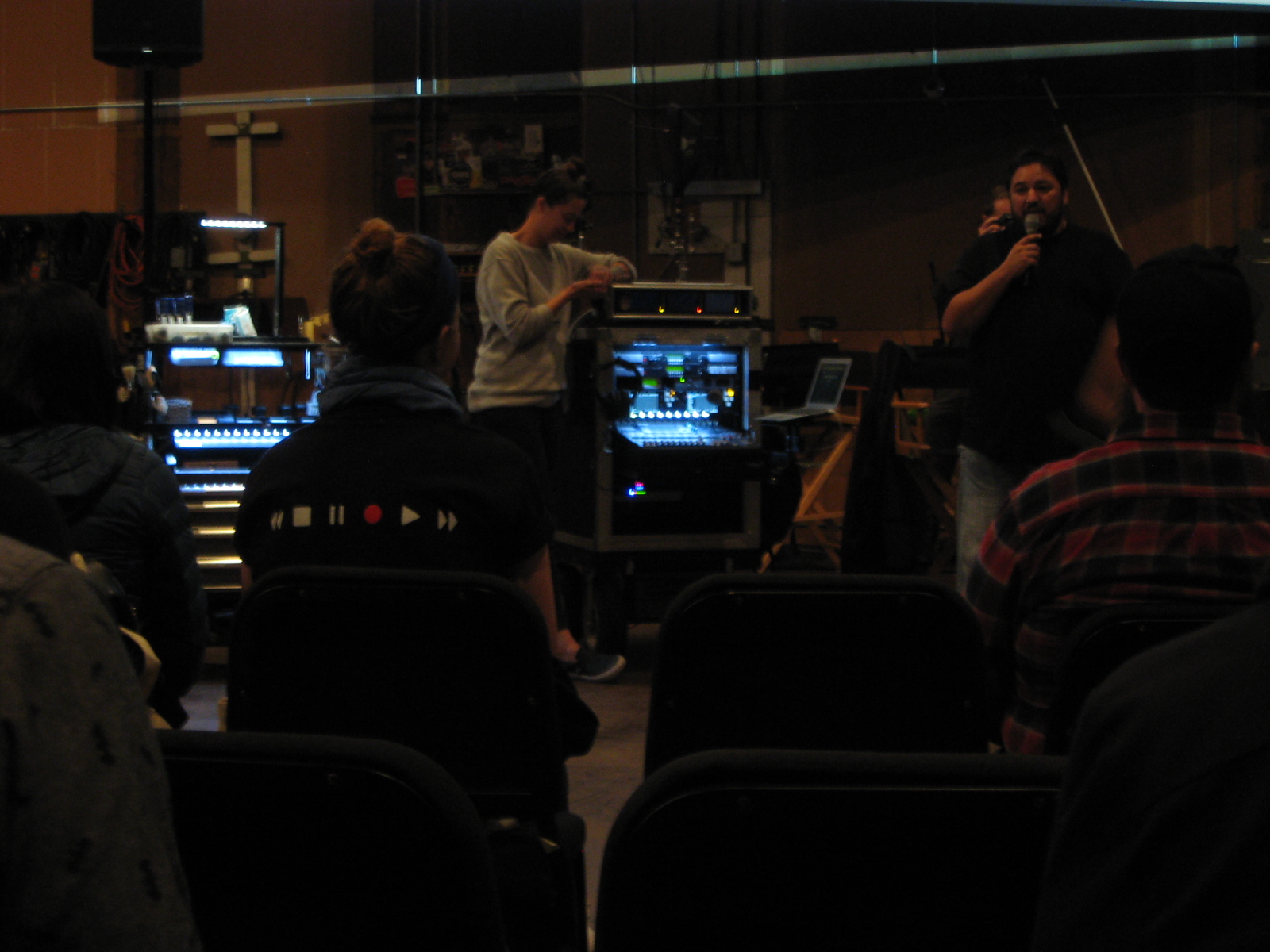
Parade of Carts

At the Animation Panel presented by Motion Picture Sound Editors panelist Eileen Horta promoted being bold, while she and the other panelists warned the differences between animation and live action.

Karol Urban moderated the Mixing Dialog: Audio Pipeline Panel, which followed the dialog process from location recording to final mix. You can listen to the panel Karol moderated here

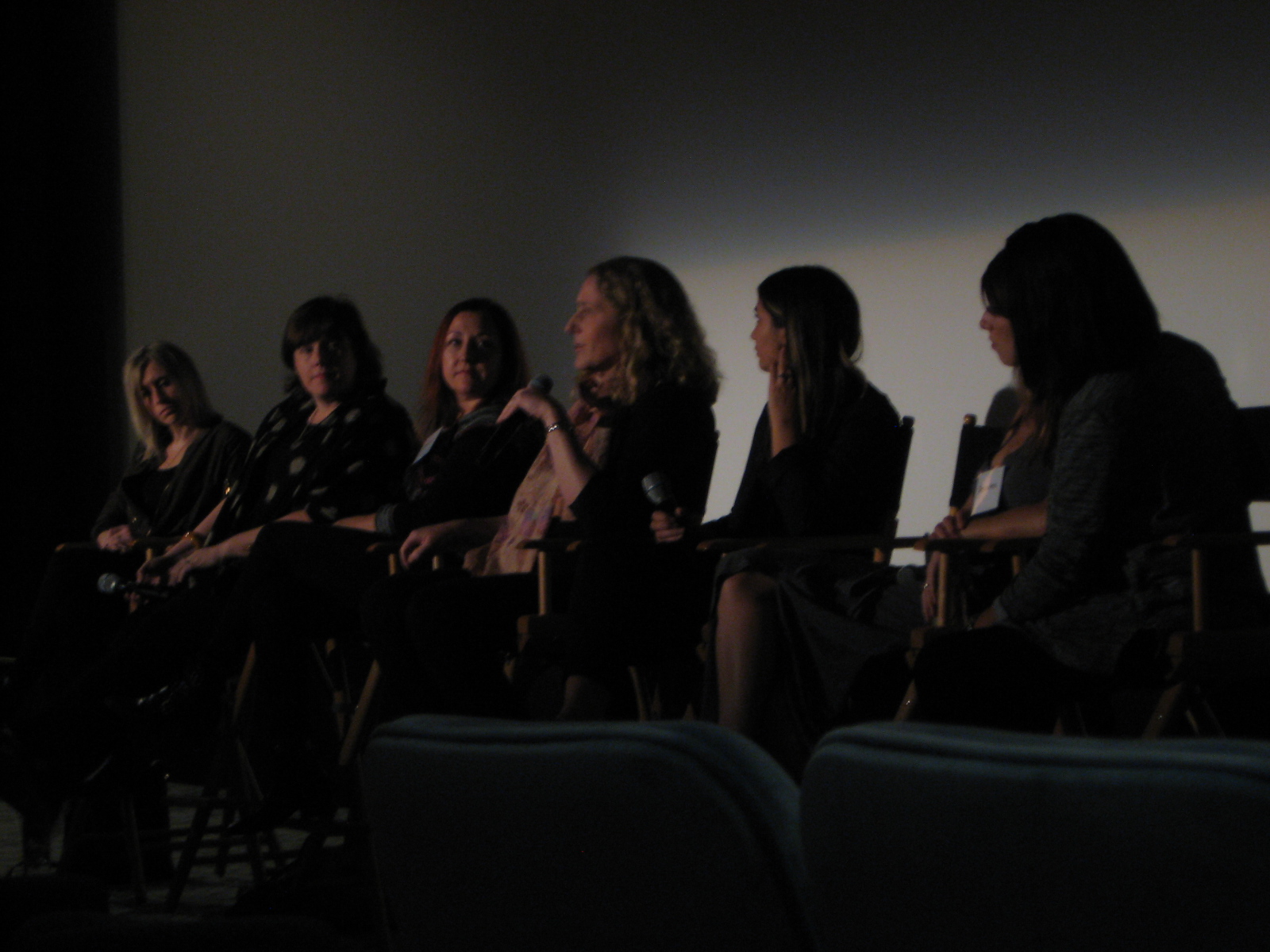
To round off my day I attended the Future is Female Panel. This was the only panel with only women presenters, but that was not the focus of the talk. Each panelist is a respected composer in the industry, and each one presented a sample of their work and an explanation of their creative process.  Other panels that I missed included Composing for Video-games, The Sound of A Star is Born, Ambisonic Recording, and hands-on Dolby Atmos demonstrations.

Future is Female Panel

At the cocktail hour, there was finally time for networking.  Breakfast and lunch held similar opportunities but within a shorter time frame.  It was in these brief moments that I connected with another new SoundGirl Julie Keller, a former choreographer who is pursuing her new love of sound editing.  She told me about the panel on The Sound and Music of Black Panther, and how the design balanced between the cultural (African drums) and the futuristic. Afterward, I went to the local SoundGirls meeting and met even more amazing people in the industry.

This was my third time attending the Sound For Film and TV conference, and it keeps getting better.  The panels and talks are always insightful, and they cover many aspects of sound for film. I feel that there is almost not enough time to see all of the panels I was interested in, and there’s a lack of networking time.  I would also like to see more booths and vendors. Overall, however, I just want to see this event continue and grow. Let’s get more SoundGirls there next year!

Editors’ note: Althought SoundGirls was not involved with Mix for Film & TV Sound, we hosted an event at Sony Studios in September. You can view our panel discussion here. Moderated by Anne Marie Slack – Panelists: Karol Urban, Kate Finan, Onnalee Blank, and April Tucker


Live Digital Audio Part 3

Digital Audio in the Real World   

Read Part One and Part Two

Knowing the theory of digital audio is all well and good, but how do you set all that stuff up on-site? First of all, both good and bad news about digital audio is a lot of the equipment looks after things like sampling and clocking for you. Word clock signal is often carried on the same path as the audio signal, so for a lot of systems, you don’t need to worry about plugging sync cables in separately at all. This automation makes it much more user-friendly and quick to set up, but it also means it can be tricky to troubleshoot because manufacturers will proudly proclaim that their system “just works!” This is also yet another subject where there is no consensus, and each brand has its preferred protocols, cables, and network topology. When using any new equipment, primarily digital, it pays to read the manual: you might find out about some crazy quirks you would never have thought of checking for. You are also likely to have several pieces of equipment from several different manufacturers; follow their advice about how to connect these together, including using the correct convertors or adaptors.

Practise best practice

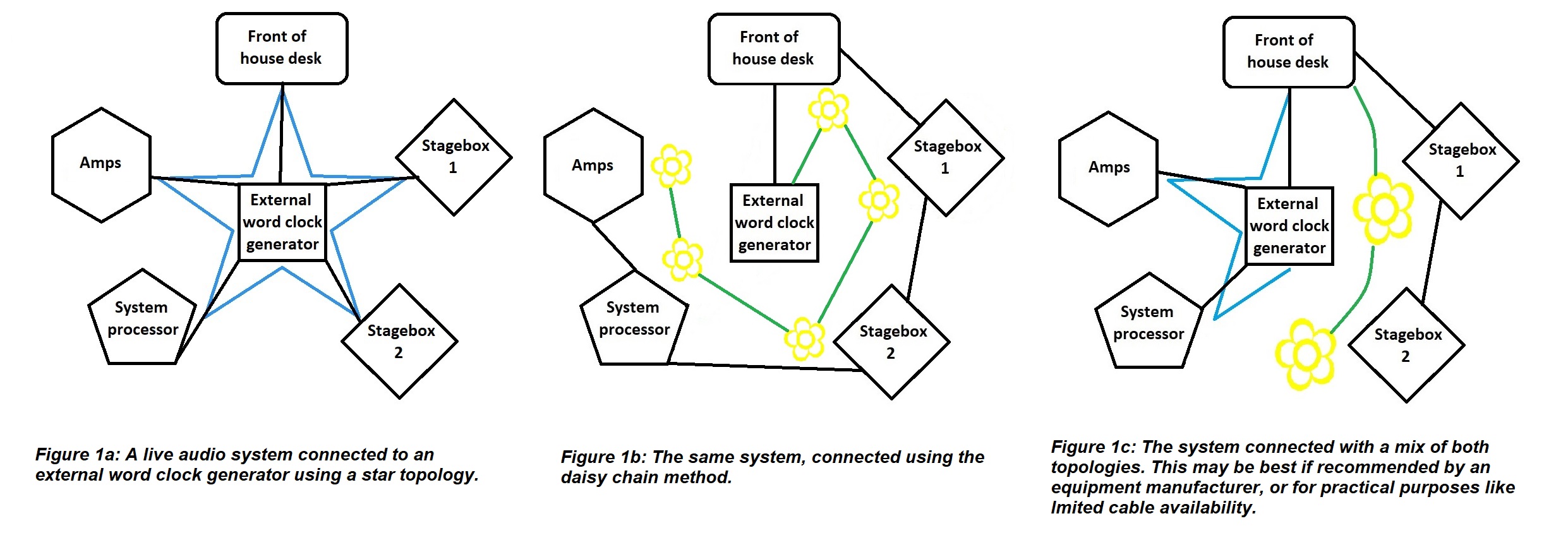
If you want to avoid digital audio issues, keep your system as simple and neat as you can. Much like analogue, you usually want to minimise the number of connections and cable length between points in your system. For example, connect your devices in a “star” topology when possible – this means each unit gets plugged straight to one central device, like a network router for system communication or master clock generator for synchronisation (like in figure 1a). The alternative is a “daisy chain” topology – linking from one unit to the next (figure 1b). Even if you use a direct output from a device, each loop through introduces latency to your system. It may be a fraction of a millisecond, but if you have several units, those can add up to cause trouble. It can also mean that if one device or cable fails in the chain, everything downstream of that loses connection. If your devices don’t have the ability to link out, you’ll need to use a splitter or ‘T’ connector to carry the chain on, which is another potential point of failure or signal loss. However, certain manufacturers recommend leaving their section of the set up (e.g., a desk and its stage boxes) connected in a chain for syncing purposes. Their argument is if everything is clocked directly to an external master and it fails, everything will fall out of sync. Their equipment was designed to work together, so allowing it all to clock from one of its own units, which in turn is clocked to your system’s master, means that if the master goes offline all that gear will at least be in sync with each other, if not the rest of your system (figure 1c).
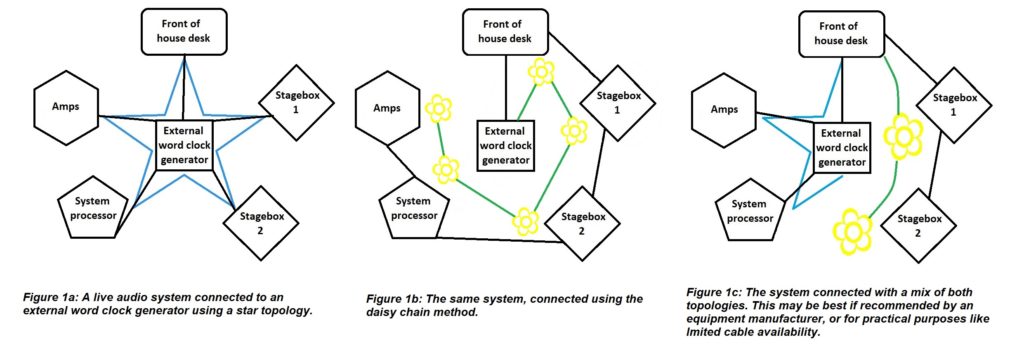
Figure 1: Different methods for connecting a live system
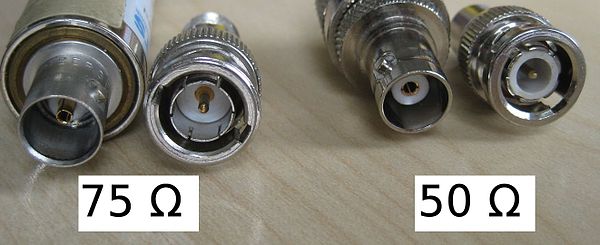
 

Figure 2: 50 ohm male and female BNC connectors (right) with their dielectric rings clearly visible, and 75 ohm male and female connectors (left) without. Source: By Kaback [CC BY-SA 3.0 (https://creativecommons.org/licenses/by-sa/3.0)], from Wikimedia Commons.
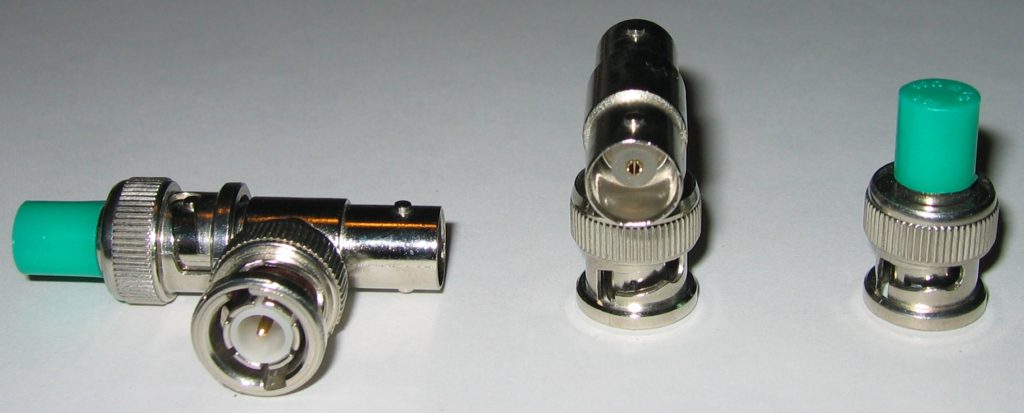
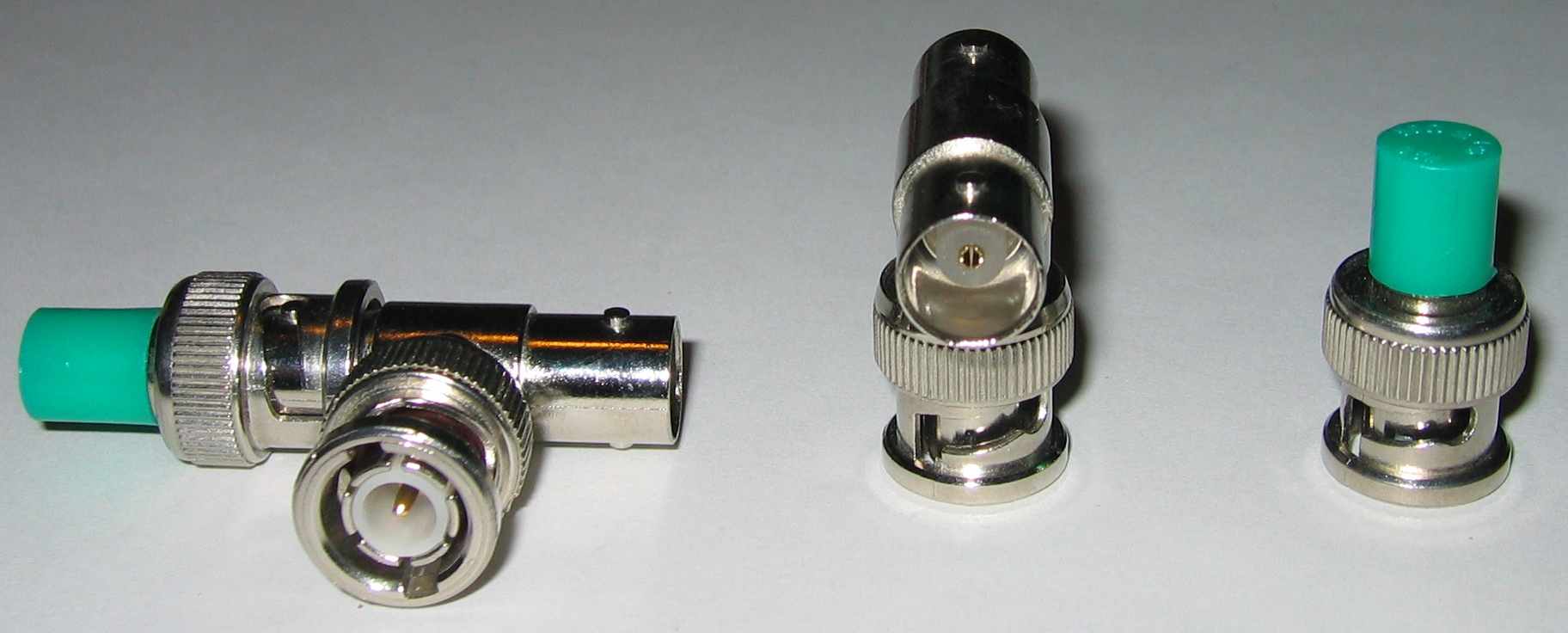
Figure 3: A BNC terminator connected to a T connector (left), a T connector (centre) and a terminator. As you can see by the dielectric material, these are actually 50 ohm connectors and would not be ideal for digital audio setup. Source: By Romantiker [GFDL (http://www.gnu.org/copyleft/fdl.html), from Wikimedia Commons.

Are you using the correct connections?

There are a whole bunch of different cables used to connect digital audio. Confusingly, several have the same connectors as other cables, and look and feel very similar. For example, your device might have BNC sockets, but should you use RG58 coaxial cable or RG59? What’s the difference? RG58 has a characteristic impedance of 50 ohms and is used for RF applications because it can deal with the high power involved in radio transmission. RG59 (you might know it as ‘video cable’) is 75 ohms and is what you need for digital audio connections. Its lower impedance will let the signal pass through it more efficiently and accurately.

Similarly, AES3 cable uses XLR connectors but is 110 ohms rather than mic cable’s 75 ohms. If you’re lucky, the grade will be printed along the length of the cable, but if not, RG59 and AES3-grade cables tend to be stiffer and less flexible than RG58 and mic cable (beware of RG213, which is even thicker than RG59! There are quite a few different cables with BNC and XLR connectors out there. If you are in charge of organising cables in your workplace, please store all these different ones in clearly marked places, far away from each other! It will save a lot of confusion). There are two different BNC connectors: a 50 ohm one with white plastic ‘dielectric’ rings and a 75 ohm one without (see figure 2). However, this isn’t a foolproof way of identifying the cable itself, because some manufacturers or repair people cut corners or are genuinely mistaken and can use the wrong ones. The shorter the distance, the less critical it is to use the correct cable, but if you’re having issues and you know you cheaped out and used let’s say mic cable instead of AES3-grade cable, swapping it for the real deal is a smart move. Make sure you don’t connect cables of different impedances too. Each time you connect a 50 ohm and 75 ohm coax together it can result in the loss of roughly 5% of your signal (this is also something to bear in mind if you know your cables have the wrong impedance connectors).

If you connect your devices to a word clock generator separate to the audio transmission, you also need to make sure that each path is terminated, to stop parts of the signal being reflected back down the cable and causing jitter. Some devices have a switchable internal terminator that you can select, or if you’re using BNC you can plug a T connector into the input of the last device in the chain, with the word clock plugged into one side of the T and a (75 ohm) terminator (see figure 3) on the other side.

Is everything singing from the same hymn sheet?

Once everything is powered up, make sure all your devices are running at the same sample rate. Most equipment these days has an internal sample rate convertor, which can switch between sample rates, called up or downsampling. Downsampling to the slowest device’s rate is the norm in live audio. This option is usually found in the system/settings menu, but sometimes there is a physical switch on the unit. If a device has a second brain/engine or fallback feature, make sure that it is also set to the correct sample rate. Some systems are now smart enough to choose the best word clock to be the master themselves and even switch to the second best one if something happens to the first, without interrupting the audio. If your system doesn’t do this, decide on a master clock and tell each device what it is. Again, this will be in the system/settings menu.

Is the network working?

If you networked units together, make sure they each have a unique IP address, that can be seen by the router (if you have a straightforward setup you may not need a separate router). If two or more devices have the same IP address, or any device has the wrong type of IP address, it will cause issues. Here is a brief rundown of the basics of IP addressing:

Static IP: You set the IP (‘internet protocol’) addresses of each device manually, and they stay the same until you change them. This is best for most live audio cases, so you can keep track of all your devices and can quickly identify which unit is faulty, for example, by its IP address.

DHCP (Dynamic Host Configuration Protocol): You let the router assign addresses. This is faster, and best if other units are likely to be added to the network without your knowledge (this is normally used for things like wifi networks in offices and cafes). As devices come and go, they are certain to have unique IP addresses and won’t clash. However, the same unit can be assigned different IP addresses over time, which can get confusing.

Subnet: The part of the IP address that a router looks at to see all the devices in a particular network. e.g., a desk might be 192.12.34.3, a stagebox might be 192.12.34.4, and they are both part of the “192.12.34.x” subnet. A laptop with the address 168.12.34.5 would not be part of that subnet.

Subnet mask: The number that defines the range of the subnet. For each section of the mask, if the number is 255, each IP address must match at that section exactly. If the number is 0, it can be any value between 0 and 255. For example, if the subnet mask is 255.255.255.0, each device’s address must match in the first three sections. 192.12.34.3 and 192.12.34.4 would be seen, but if an amp was set to 192.12.56.7, it wouldn’t be seen. If you expanded the subnet mask to 255.255.0.0 the amp would then be seen by the router, along with anything else that had an IP address starting with 192.12. (so that laptop would still not be seen as part of the subnet). It is best to avoid assigning IP addresses that end in 0 or 255 because these are often used by the router for its own system tasks.

It might seem like a lot to take in, but most of this only really comes down to setting up like you would an analogue system, then doing a few extra checks in your gear’s settings menus. Getting the fundamentals right will minimise the need for troubleshooting, which I promise I will get on to in my next post!

SoundGirls Launches Initiative for Members Working in Production Sound

Film is one of the most powerful forms of media in our society.  Historically, it has been controlled by a specific privileged group of people, but now is a critical moment of change in human culture.  More and more it is recognized that diversity of thought would create a healthier society and world. For this to be accomplished, we need diversity among the people who produce films.

SoundGirls is on the front line of this change. Fewer than 5% of sound professionals are women, and SoundGirls works to increase that percentage.  Starting in 2013, as a grassroots organization for women working in audio and we have grown into an international organization with over 6,000 members and chapters worldwide.

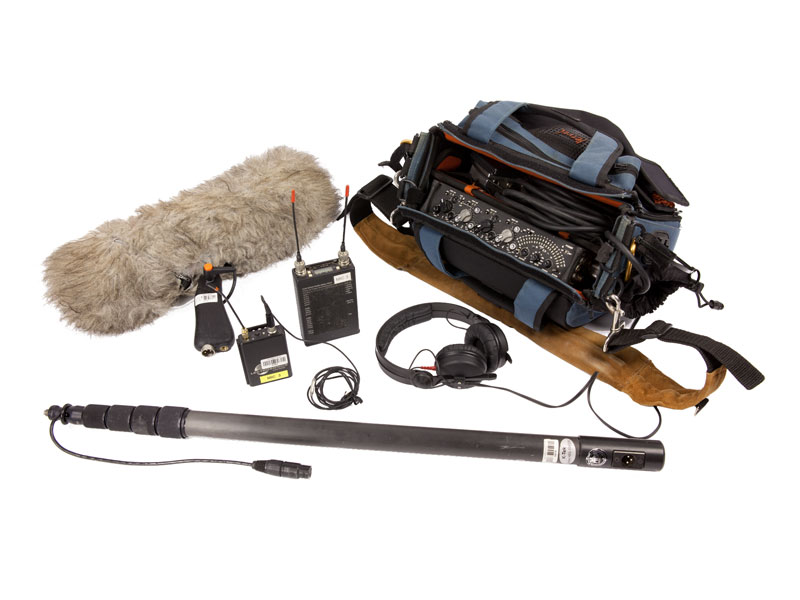
One of the barriers for women and non-binary people entering this field is access to work-experience and mentors. Last year, SoundGirls Productions was launched to proactively create employment and mentoring for women, non-binary people, and marginalized groups in sound.  We provide sound services and work-experience for live events in the Los Angeles area. This initiative will not fall under SoundGirls Productions, but under the mission of SoundGirls, and will provide members wanting to work in the film industry real-world experiences working on film shoots.  To further these aims, we are gathering a pool of location-sound gear that members can borrow to work on film shoots to gain valueable work-experience.

It is our hope to find audio manufacturers and members who support our mission and will sponsor SoundGirls by donating gear.  We need industry-standard microphones, mixer/recorders, and wireless lavs, as well as boom poles, bags, cables, timecode devices, and accessories. Soundgirls is a non-profit organization, and donations are tax deductible.

If your company would like to donate, please get in touch with us, and we will coordinate shipping and invoicing.  Your donation will be put to good use and greatly appreciated. soundgirls@soundgirls.org

The SoundGirls Team


Equipment List

We are happy to accept b-stock, demo units, used equipment, or monetary donations

Lectrosonics

Sennheiser

Sanken

Sound Devices

Deneke

DPA Microphones

Zoom

Zaxcom

Microphones

Windscreens / Shock Mounts

Boompoles

Bags/Harnesses

Other Gear


Missed this Week’s Top Stories? Read our Quick Round-up!

It’s easy to miss the SoundGirls news and blogs, so we have put together a round-up of the blogs, articles, and news from the past week. You can keep up to date and read more at SoundGirls.org

October Feature Profile

First to Record Elvis – Marion Keisker


SoundGirls Panel – Career Paths in Film & TV at Sony Studios


The Blogs

The Importance of Good Production Sound

Preventing the Burnout

A Guide to Supporting Women in Sound


SoundGirls News

https://soundgirls.org/event/philadelphia-soundgirls-event/?instance_id=1352

Chance to Win Mix with the Masters with Tom Lord-Alge

Analog/Tape Recording Workshop w/Lenise Bent

Sexual Harassment Seminar

https://soundgirls.org/event/orlando-soundgirls-social-4/?instance_id=1388

https://soundgirls.org/namm-2019-badges-for-soundgirls-members-2/

NAMM Mentoring Session 2019

She Rocks at NAMM Ticket Orders

SoundGirls and SoundGym

Shadowing/Mentoring/Internship Opportunities

https://soundgirls.org/shadowing-opportunity-brad-madix-and-annette-guilfoyle/

Shadow Beth O’Leary ME Tech on Kylie Minogue

Shadowing Opportunity w/ FOH Engineer Sean “Sully” Sullivan

Shadowing Opportunity w/ ME Aaron Foye

https://soundgirls.org/soundgirls-mentoring/


Round Up From the Internet

AES Diversity and Inclusion Committee Acts with Intention

The AES Diversity and Inclusion Committee met yesterday to discuss goals and accomplishments as part of the organization’s efforts to better represent all segments of the pro audio community.


Meet the people creating the Code of Conduct to end sexual harassment in dance music


SoundGirls Resources

Directory of Women in Professional Audio and Production

This directory provides a listing of women in disciplines industry-wide for networking and hiring. It’s free – add your name, upload your resume, and share with your colleagues across the industry.

SoundGirls – Gaston-Bird Travel Fund

Letter for Trades and Manufacturers


Women-Owned Businesses

SoundGirls Scholarships 2021 Now Open

Events

Sexual Harassment

https://soundgirls.org/about-us/soundgirls-chapters/

Jobs and Internships

Women in the Professional Audio

Member Benefits

Shadowing Opportunity – Brad Madix and Annette Guilfoyle

Shadowing Opportunity with Brad Madix and Annette Guilfoyle

SoundGirls Members who are actively pursuing a career in Live Sound or Concert Production are invited to shadow FOH Engineer Brad Madix and Monitor Engineer Annette Guilfoyle on Florence and the Machine.

Brad and Annette will be offering more opportunities in 2019. Stay Tuned

Please fill out this application and send a resume to soundgirls@soundgirls.org with Florence in the subject line. If you are selected to attend, information will be emailed to you.

About FOH Engineer Brad Madix: Award-winning, Grammy-nominated live, broadcast and recording engineer since 1984. Clients include: Florence + The Machine, Linkin Park, Rush, Jack White, Beck, Van Halen, Shakira, Alanis Morissette, Jane’s Addiction, Jessica Simpson, Rage Against the Machine, Shania Twain, Def Leppard, Bruce Hornsby, Queensryche, Lynyrd Skynyrd, Journey, Marilyn Manson, Mr. Big, Jerry Cantrell, Smashing Pumpkins, Veruca Salt, Suicidal Tendencies, Slayer, and Psychedelic Furs. FOH Interview with Brad Madix

Monitor Engineer Annette Guilfoyle:  Annette has been working in professional audio for over 20 years and is currently the monitor engineer for Florence and the Machine. Annette has worked as a FOH and Monitor Engineer, as well as system teching. She has mixed monitors for Paul Weller, Goldfrapp, Ocean Colour Scene, Editors, Elvis Live in Concert with Orchestra and more.


The Importance of Good Production Sound

From a post-production perspective

In a tv show or movie, the dialog is the core of the mix. Music, sound effects, and Foley add interest and excitement, but it all fundamentally works around dialog. Dialog is typically how we learn the characters’ names, their relationship to the other characters, and what challenges each character faces. We learn what the story is about and watch that story develop through dialog.

You could argue dialog is the most crucial element of film and tv sound. You can remove sound fx or music from a movie, and you’ll still have a playable movie (maybe not the most interesting movie – but you can watch it). If you remove the dialog track, it would be a tech problem – not a movie.

Poor dialog quality (or mix) can be the difference between the success and failure of a film, too. If you can’t understand what anyone is saying, how long would it be before you watch something else?

Even though dialog is clearly significant, you’d be amazed how many projects have poor (or very poor) production sound. I know the problem isn’t the sound people being hired. I can often tell just by listening to mics whether they had a sound mixer/boom op or not. The problem is the projects that didn’t hire the sound crew necessary to do the job right. The problem is the gear needed for the job that production didn’t want to pay to rent.

The basics of production microphones

To capture dialog, there are two primary types of mics you’ll see in a professional setting: boom and lavalier mics. Here’s how they are ideally used:

Lavalier mic (or lavs). This is a small mic placed on the body. In an ideal situation, everyone with a speaking line will wear their own lav mic.

Boom mic (sometimes called a shotgun mic) or hypercardioid mic. These mics are highly directional (picking up whatever it is pointed at and rejecting sounds coming to the sides of the mic). With proper placement (by a boom operator), these mics do an amazing job at capturing the body of the voice, articulation, and ambience in a way that sounds natural and balanced.

Production sound mixers aren’t limited to these microphones. Many get creative to capture the sound they’re looking for (and remain hidden from cameras). That’s one of the fun parts of the job.

Some ways projects cut corners that negatively affect dialog quality

If a project has poor production sound, there’s a number of consequences for post-production

It adds expenses to post-production sound to fix problems created by production sound.

Time/budget is taken away from other areas of post-production sound. It’s more time fixing problems and less time enhancing or doing creative work.

When there’s only one lav covering multiple people (or a boom covering on-mic and off-mic characters at once), it takes a lot more time and detail work for a re-recording mixer to balance. One person will sound close/present and loud, and the other will sound off-mic/distant and softer. The way to make the two sound alike is to take the person who sounds good and make them sound crappier to match.

When lav mics are placed poorly, there can be lots of weird body resonances that take time and work to EQ. There might not be any high end in the mic to bring out. If there’s any sort of cloth rubbing on the mic, clothes noise, or jewelry, it takes time to decrackle and denoise, and there’s no guarantee it will fully come out with processing.

When someone without sound experience is placing mics and setting levels, it can lead to extra work in post-production to correct issues such as low gain, hiss, and distortion. Booms that are placed too close are often sibilant and need extra de-essing work. A re-recording mixer could spend hours correcting something that would have been a couple seconds adjustment on set by a sound person who knew what to listen for.

When a camera mic (a boom attached to a camera or a built-in microphone) is used, the mic is usually much too far away from the source. It takes a lot of work (de-noise, de-verb, etc.) and the end result is usually still poor quality sound. Camera mics often don’t sound professional, and that’s why a lot of professionals in post-production pass on projects with only a camera mic.

Noisy locations mean noise reduction which means extra time needed for an editor and mixer. If the noise is inconsistent (like wind on a mic), it can also be a challenge for a picture editor also who might be hearing the noise come and go in their edit. Some location noise is unavoidable, but that’s where having an experienced sound mixer and boom op can attempt to minimize the problem.

Needing ADR. The cost of an ADR studio and engineer, bringing in actors, etc. can get pricy very quickly. The #1 note I’ve heard in ADR sessions (from directors, producers, and actors) is the actor’s performance in the studio doesn’t match what they did on set. It feels stale or forced, or it just doesn’t match the feel or intensity. It’s a challenge even for some major stars. Then, you get to the challenges of matching ADR (sound-wise). Some actors are amazing with ADR (and there are engineers who do a brilliant job matching sounds from on set) but what if the whole ordeal could have been avoided?

The reality of production sound

As a re-recording mixer (and sound supervisor), I get approached with a variety of projects (from amateur to indie to professional). If it’s something I’m potentially interested in, I ask for a sound sample. I ask what mics were used on set. It’s sad to turn down projects because of poor production audio when it looks great, has an interesting story, and has great people behind it. These projects clearly put time and effort into lighting, cinematography, and capturing beautiful shots. If you close your eyes, you would think it was a home video captured from across the room.

I empathize with filmmakers, and I see how these choices can happen. Even some professional filmmakers pay out of pocket and borrow equipment and ask for favors to get their passion projects made. The majority of films made today don’t have the financial support of a studio. We’re in an era where Kickstarter is the financial backing for a short or indie film. Directors produce their own films then pay even more money to be considered for film festivals. It could be a year or more before a film is even considered for a distribution deal. There are a lot of risks and never a guarantee of a return.

Poor audio quality (and especially dialog quality) affects a film’s ability to get into film festivals, get distribution deals, and the ability to be broadcast. At the end of the day, that’s why production sound is worth the investment. Why mess around with the most crucial element of film and tv sound?


X