I’ve had countless people ask me, “what’s the biggest mistake you’ve made?” Fortunately for me, most of my stories were smaller things that the audience might not have noticed or equipment malfunctions that I couldn’t control. That changed a couple months ago.
We all like to think that the longer we do something, the less likely we are to slip up. Practice makes perfect, right? The reality is, if you do anything enough times, even the one-in-a-million chance will happen. Sometimes it’s the equipment, other times it’s a slip up from inattention. No matter our best intentions, our jobs can be unpredictable.
In this case, it was human error.
I was subbing on the mix at SIX, in the middle of the opening number, a little more on-alert than normal because we had a swing going on for the first time as Aragon. That in itself wasn’t too stressful; it mostly meant I was glancing over more often to check the chat on the RF computer, watching if the A1 (who was running the deck track) had any adjustments for the swing’s in-ears.
Everything was going well. The chat was quiet, the Queens were belting their hearts out, the band had just rocked their solos, and I hit their reset right on the beat, a simultaneous move of hitting a macro (a pre-programmable button) and popping their CG fader to the right mark (Control Groups on DiGiCo consoles, also called DCAs or VCAs on other boards).
We continued along and were about to head into the last big chorus of the song when I fired a cue—
And immediately lost all my vocals.
My stomach felt like it dropped to my toes and my censored thoughts would have made the strongest password in existence.
The band was (thankfully) still in the system and a panicked glance at the stage showed me that the Queens were still singing, but you couldn’t hear their un-amplified voices over the band.
Fighting through the initial panic, I looked down and saw I didn’t have any of the Queens on the CGs in front of me. Analysis mode kicked in and I knew that meant I was either in the wrong snapshot, or the data had been wiped from the one I was in (highly unlikely). However, likely or not, either problem would be fixed by firing the first snapshot of the opening number.
The vocals came back and I remembered how to breathe.
Now we were functional, but I needed to get my show back on track.
First, I went to the cue list on the Qlab computer to line up where we needed to be. That’s when I saw that the playhead (which shows which cue will fire next) was all the way at the top when it should have been several cues down the list by this point in the show.
I’d found the culprit! Somehow the playhead had reset to the top and when I fired the next cue, it put us back into the preset snapshot, which only had the band on the CGs.
For context: British design teams typically use Qlab as the hub to fire everything (console snapshots, sound effects, reverbs, etc). American designers typically used the console as that main controller.
Even though I didn’t know why the playhead reset, I at least knew what caused the immediate problem. I radioed backstage to tell the A1 and let them know that Qlab had reset for some reason (what caused the chaos), I should be able to get back on track (no need for a show stop or other extreme measures), but I wasn’t sure why (some additional troubleshooting might be required).
As I was relaying that information, I looked back at the console and saw my macros.
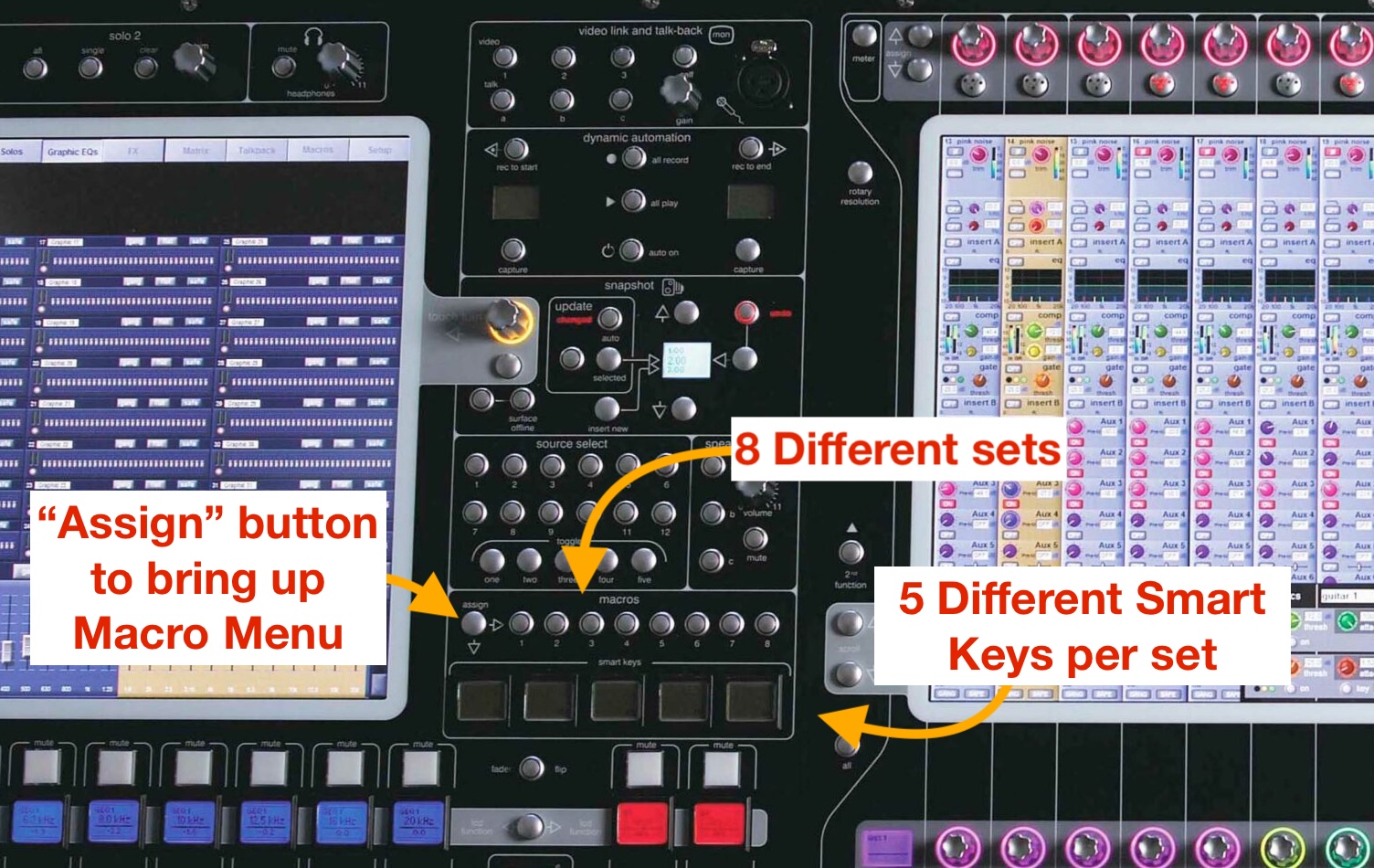
On the SD7 there are 5 physical buttons on the console and 8 different “sets” that you can select from, for a total of 40 macros that are quickly accessible. For SIX, if you’re on Set 2, you have triggers for Qlab: “Previous” or “Next” to move the playhead up or down the list, “Go” for firing the selected cue, “Stop All,” or “Reset All” which moves the playhead back to the top of the list.
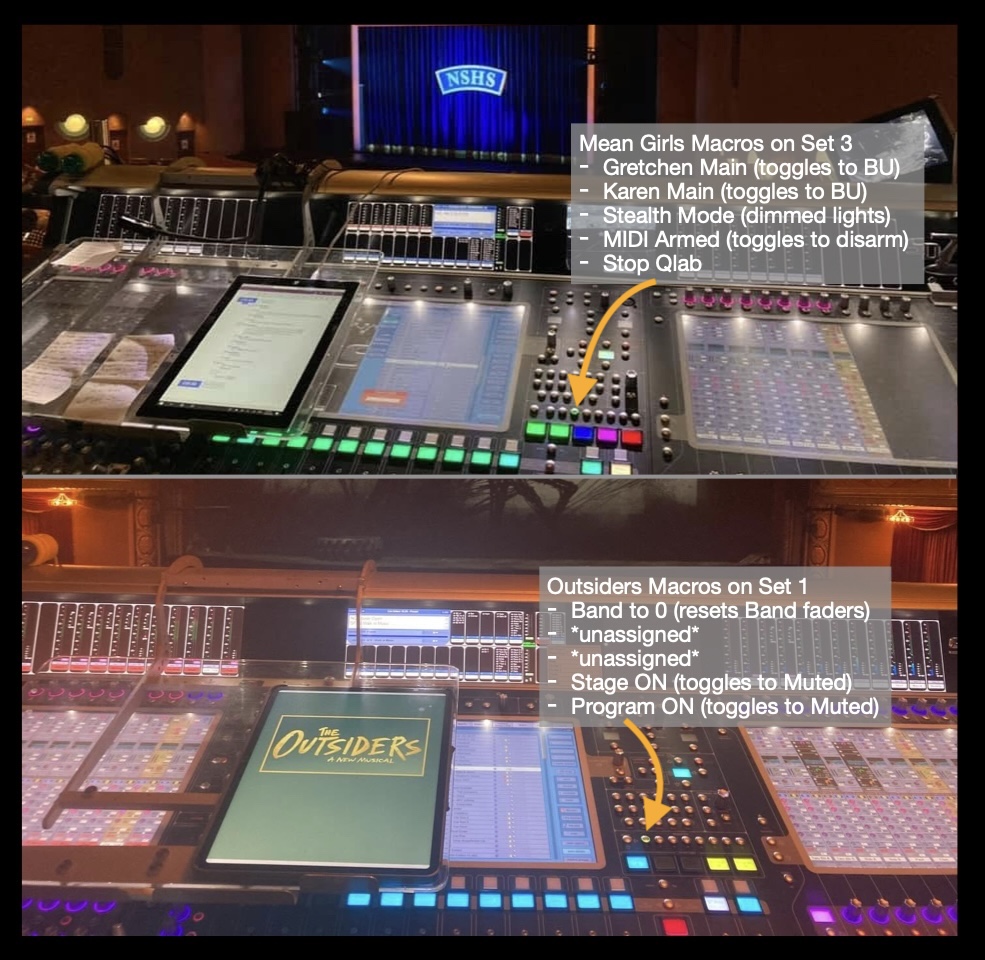
While you’re running the show, you want to be on Set 6. This set has a “Reset Band” macro that you use to re-racks the band faders to unity after you push them for solos. This band reset happens to be on the fifth button of that set….the same button that is “Reset All” on Set 2.
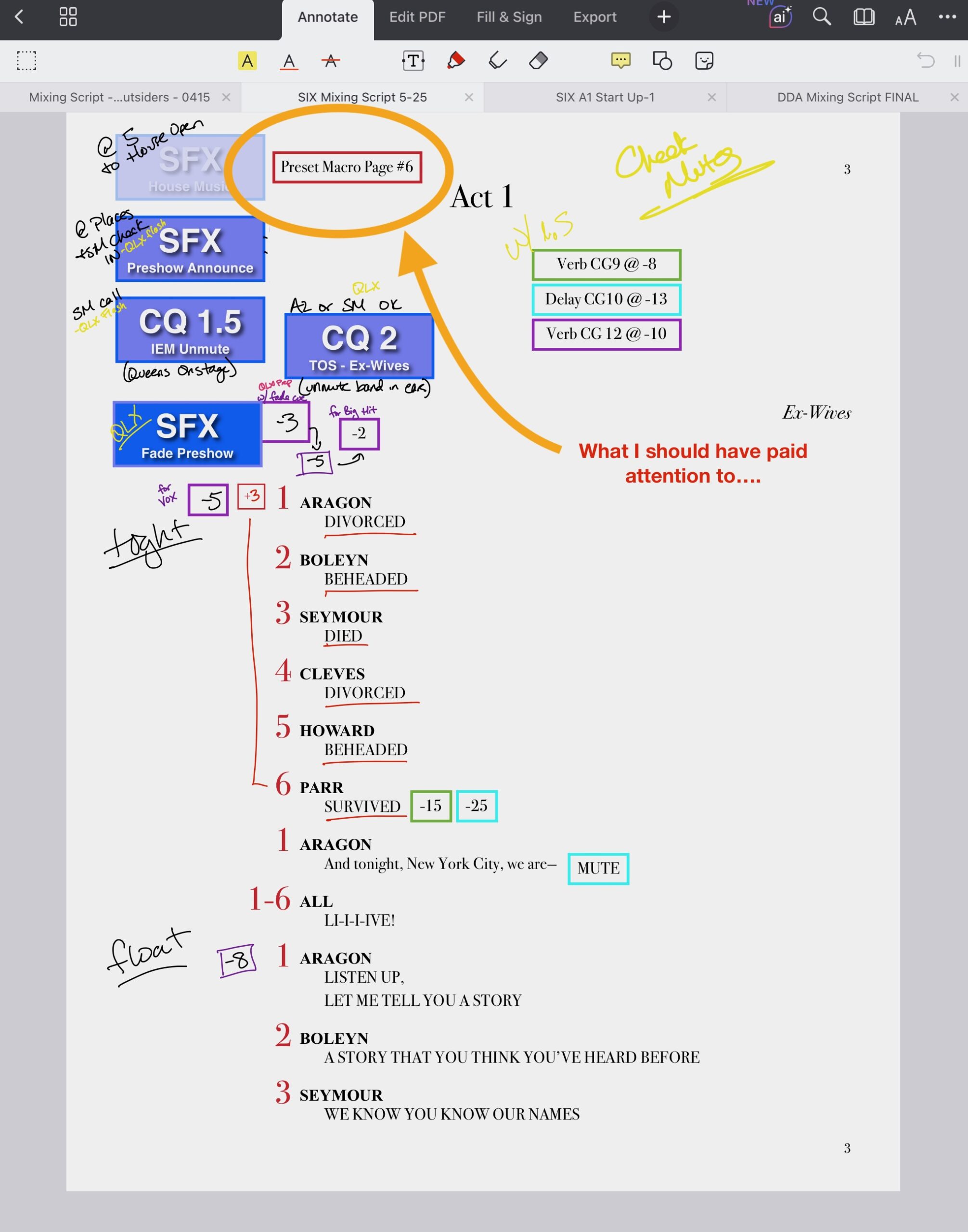
Everything clicked. We’d done a quick sound check with the new Aragon right before we opened the house and I’d reset the Qlab computers with the macros. Then completely ignored the note in my script to put the macros on Set 6.
Screenshot
That meant, instead of resetting the band CGs after their solos, I’d actually reset the playhead in Qlab, sending it back to the top of the playlist. When I fired my next cue, it triggered the preset snapshot instead, putting me in a cue without the Queens on my CGs.
Thankfully I can multitask, so I called myself a million types of an idiot while I used the “Next” Qlab macro to line up the right cue.
I had just enough time to take a deep breath, hit the band bump at the end of the song, and fire next cue which officially got me back on track. Once Aragon started her monologue I radioed backstage again to update the A1 on what I’d learned and let them know they didn’t need to troubleshoot anything.
All told, the whole event lasted maybe 30 seconds in total: 5 for the Queens to be out of the system and the rest to get back on track. But it felt like an eternity.
After the show, I promptly apologized to the A1 and described in detail what had happened. I knew that someone would have to tell Stage Management what to put in the performance report, so I offered to be the one to explain it. The A1 said they’d handle it.
I also apologized to the Queens as they were getting out of costume, especially the actress debuting as Aragon. If I hadn’t found her in the quick change booth, I would have gone to her dressing room to specifically check in about what had happened.
All in all, it wasn’t a great experience (it never is), but the fact that it was solved quickly and I took accountability immediately meant that everyone moved past the mistake with little fuss.
However, I took a little more time than everyone else to get over it. When something goes wrong there’s a trust that breaks and needs time to repair. If equipment malfunctions, you find yourself on edge, just waiting for something else to go wrong. With human error, I lose trust in myself. For the rest of that show (and several shows after) I was constantly double checking what I was doing: watching the Qlab screen as I took a cue, obsessively checking that the macro page was on the right set. It takes time, but eventually you rebuild that trust and can relax back into the mix.
In my experience, there are six phases that happen when I make a mistake:
First: Panic.
Unfortunately, this is one thing you can’t control when you mess up. You just have to acknowledge it and try to move on to the next step as quickly as you can, which is:
Troubleshooting.
The faster “WTF?!” turns into “WTF is going on?” the better. Gather data (like the Queens are no longer on the DCAs) so you can figure out what specifically is wrong and you can continue to:
Your Immediate Action.
What stops the bleeding? You don’t have to get back on track right now, just fix your immediate problem. In my case, it was putting us in a scene, any scene, that had the Queens on the CGs. That way we only lost them for a couple seconds instead of the full time it took for me to figure out what was going on. Once you’re functional you can start:
Course Correction.
You’re past the current danger, which means you can take a moment to figure out where you are and where you need to be. How do you get back to the right scene, the right effects, or ready to fire the next sound effect, etc. Once you’re back on track you can:
Analyze.
You’ve freed up more brain space and you can go through the problem, how you had to fix it, and make some logical conclusions about what happened.
Some of these steps happen simultaneously. You can panic while you troubleshoot. Course correction gives you information to analyze what went wrong, but not always the full picture. Sometimes you need help figuring things out which leads us to the last step:
Communication.
This is the final and most important step. Whenever you can, let someone backstage (most likely your A2) know what’s going on. If you couldn’t figure out what caused the problem, they can keep an eye on things to see if they can identify it. If you already know what happened, they can stand down and don’t have to spend the rest of the show on high alert. They can also let other people (like SMs) know what’s happening so everyone’s on the same page while you get back to focusing on the mix.
If you don’t have an A2, get on com and talk to SMs directly, whether that’s a quick “I figured it out, we’re good” or a “honestly, no idea what happened, I’ll let you know, but be prepared for some surprises.”
Not only should you communicate in the moment, but follow up afterwards as well. Either at intermission or the end of the show (whichever comes first, don’t get into a habit of putting this off!), talk to management and anyone directly effected by the issue. Explain what happened, what the next steps will look like (if it’s something you need to fix), and apologize if it was your error.
As the sub, I went to the full time crew (the A1) and also talked to Aragon. If I were the full time A1 I would have gone to the SM myself to tell them how to word it for the show report.
Taking accountability builds trust and helps to diffuse a situation before people get worried and agitated. Our Aragon felt better that someone explained what happened, and was happy to extend some grace for being kept in the loop. The A1 appreciated hearing quickly that they didn’t have to spend the entire show worrying about what else could go wrong.
I’ve had countless (thankfully less show-critical) mistakes where the fallout has been minimal because I speak up immediately if I know I’m at fault.
On one show, I left a god mic muted during a preview and (of course) that was a show we had technical issues and needed to stop, but our SM couldn’t talk to the audience because his mic wasn’t going through the system.
When I got on com and told him it was my fault, he went from frantic and angry to just amped up on adrenaline. He would have been completely justified to get mad at me, but once he knew what was going on he actually thanked me for letting him know before he mistakenly yelled at someone else.
During tech on a different show, I muted a Qlab channel as I was flipping through banks, and we didn’t have music as we worked through a transition. I realized what had happened and called it out on radio that it was my mistake. Later the programmer and I joked that you could see that designer was ready to jump down the programmer’s throat but immediately deflated to “oh, that’s okay. Are we good now?” when I took the blame.
I’ve found it’s one of my superpowers that people don’t tend to stay mad at me. In large part that’s because I step up and take accountability, then do my best to fix the problem. My designers and management can see I’m proactive and only make a mistake once, while my colleagues learn that I won’t throw them under the bus if I’m in the wrong. Plus, it’s really hard for someone to yell at you when you agree that it’s your fault and apologize.
Mistakes can and will happen no matter where you are in your career. It’s how you deal with them that shows your true professionalism.