Empowering the Next Generation of Women in Audio

Join Us

Navigating through Coronavirus

The outbreak of coronavirus is impacting us all. Whether you’re a freelance musician or salaried employee the virus has shut down multiple sectors leaving many worried about the future ahead. In spite of this, and I by no means want to make light of a very serious situation, I have prepared some links to some things that can help those working in the music industry.

Moog + Korg 

These companies have offered up some free apps for a limited time and both are available on the App store.

AVID

If you use products like Pro Tools and Sibelius, Avid has said ‘As an added measure to assist our community in adjusting their workflows to accommodate COVID-19 virus precautions, Avid will be providing temporary licenses of our creative tools to customers at no charge.’ 

Spotify

Spotify has pledged $10 million dollars to musicians impacted by the coronavirus. Spotify has said to have created a feature for artists to link donation pages to their profiles.

Musicians Union, PRS, MusiCares 

These companies have all released financial support to those severely struggling in some way or another. If you are a member, you will have likely received an email. If not more information can be found on the respective sites.

Alternative Work + Training

If you are able to, there are a lot of online courses and SoundGirls has a great directory. Sites like Fiverr and People Per Hour are a great way to offer services whilst stuck at home.

You can find a detailed list of financial, educational, and jobs here

I hope some of these small ideas can help and remember the important thing is to stay safe. This too shall pass.


3 Easy Steps to Cutting Classic Cartoon Sound Effects

At Boom Box Post, we specialize in sound for animation.  Although sonic sensibilities are moving toward a more realistic take, we still do a fair amount of work that harkens back to the classic cartoon sonic styles of shows like Tom and Jerry or Looney Tunes.  Frequently, this style is one of the most difficult skills to teach new editors.  It requires a good working knowledge of keywords to search in the library–since almost all cartoon sound effects are named with onomatopoeic names rather than real words like “boing”, “bork”, and “bewip”–an impeccable sense of timing, and a slight taste for the absurd.

I used to think that you were either funny or not.  Either you inherently understood how to cut a sonic joke, or you just couldn’t do it.  Period.  But, recently, I began deconstructing my own process of sonic joke-telling and teaching my formula to a few of our editors.  I was absolutely floored by the results.  It turns out, you can learn to be funny!  It’s just a matter of understanding how to properly construct a joke.


WHAT NOT TO DO

Before I get into what to do, I think it’s important to point out what not to do.  When editors start cutting classic cartoon sound effects for the first time, they pretty much always have the same problem.  They stumble upon the Hanna-Barbera sound effects library and find some really funny sounds.  Bulb horns–those are always funny!  Boings–hilarious!  Splats–comic genius!  Then, one by one, they start sprinkling these in whenever they feel there’s a dull moment.

Let me say this once: A single funny sound effect is almost never funny.  It’s like blurting out the punchline of a joke without the setup.

Here’s an example of a joke: Someone stole my Microsoft Office and they’re going to pay.  You have my Word.  

I know this is a super lame joke… but it is a joke nonetheless and if you told it at a party, you’d probably be rewarded with an awkward groan/chuckle.  Cutting just a single bulb horn at a random moment is like yelling out “Microsoft Office!” in the middle of a party and expecting people to laugh.  It’s just not funny.  Cutting cartoon sound effects is not the artform of adding “funny” sounds randomly into a visual work, it’s the art of telling a sonic joke.  And to tell a joke, you need three parts: the introduction, the setup, and the punchline.  If you want to go one step further, you can add a bonus part: the tag.


AN EXAMPLE OF JOKE CONSTRUCTION IN PROGRESS

Love him or hate him, this video example of Jerry Seinfeld talking about his process in writing a Pop-Tart joke is very illuminating.  There are many different elements that go into how funny your joke will be perceived to be.  They are things like: how incongruous are the words (or sounds) to each other, how surprising is the punchline at the end, how well were elements from the setup woven back into the punchline, how well did you captivate your audience by the “story” of the joke.  With that in mind, it’s not hard to see why it would take two years to craft the perfect Pop-Tart joke.

Watch the video here.

ANATOMY OF A JOKE: THE INTRODUCTION

When telling a joke, this is your first sentence.  It lets the audience know where you’re starting.  In the case of Jerry’s Pop-Tart joke, this is when he starts talking about breakfast in the 1960s being composed of frozen orange juice and toast.  From this, we understand that this is going to be a joke about breakfast.

In sound, the importance of the introduction is all about timing. Take a Mickey and the Roadster Racers that one of our editors, Brad Meyer, and I worked on.  There was a sequence where all of the characters were driving around and Goofy was holding a stolen diamond.  It was incredibly valuable and he was nervous to be mistakenly caught with it and possibly taken for the thief.  At one point, he abruptly came to a stop, the diamond flew out of his car and landing in a Ferris wheel bucket.  The Ferris wheel then began to turn around, and the two characters (one good guy and one bad guy) scrambled to enter the bucket with it.  Up they went with the diamond to the top when it, of course, slipped from their hands, bounced down the spokes of the Ferris wheel one by one, and then landed neatly in Goofy’s car at the bottom.

In this sound design example, choosing the point at which we kick off the joke is key. Like I mentioned earlier, if we just sprinkle cartoon sound effects in whenever anything slightly “toony” happens in the visual, it’s not really a joke.  We’re just shouting funny-sounding words at a party.  Instead, we need to choose an exact moment to begin the joke.  That moment would be when the diamond flies out of Goofy’s car.  We chose a simple sail zip whistle to kick this off, and a glass clink when the diamond landed in the bucket. Those two sounds were our introduction to the joke. Keep in mind that from this moment, our goal is to make all of the following cartoon sound effects create anticipation leading up to the final “punchline” effect.

ANATOMY OF A JOKE: THE SETUP

In Jerry’s Pop-Tart joke, after introducing us to the idea that he’s talking about breakfast, he continues his setup by us about the downside of all of the prevailing breakfast foods of the 1960s.  Then, he announces the arrival of the Pop-Tart, likening it to the arrival of an alien spacecraft, and he and his friends were like “chimps in the dirt playing with sticks.”  As he points out–in that phrase alone, there are four very funny words: chimps, dirt, playing, sticks.

The setup is the story.  It takes us on a journey and gives us all of the elements we need to pull together the punchline.  But, notice that the more incongruous the elements of the setup, the better the punchline comes off.  What do breakfast, aliens, chimps, dirt, and sticks have in common?  Nothing.  Absolutely nothing.  This is exactly why it’s a great setup.

In sound, the idea is the same.  You kick off the joke with something that makes sense (like a sail zip for an item flying into the air).  In the example of the scene from Mickey and the Roadster Racers, we cut completely incongruous cartoon sounds for the landing of the hero and villain in the bucket (timpani hits), followed by a spin whistle for them scrambling to grab the diamond.  Then, when they got to the top, we cut different pitched glass “tinks” (ascending in pitch with each one) for the diamond falling and hitting spokes of the Ferris wheel along the way. Not only are all of these sounds funny on their own, but they are funnier because they are so different from one another.  Also note that these sounds, although different from one another, continue to build tension leading to the next moment.

ANATOMY OF A JOKE: THE PUNCHLINE

In the Pop-Tart joke, Jerry gives the punchline of wondering how they knew that there would be a demand for “a frosted fruit-filled heatable rectangle in the same shape as the box it comes in, and with the same nutritional value as the box it comes in.”  And he goes on to wrap it up by telling us that in the midst of hopelessness, the Pop-Tart appeared to meet that need of the people.  This punchline works because it harkens back to the introduction when Jerry tells us of the dire state of breakfast choices in America.  The people were in need, and a savior appeared.

In our sonic cartoon example, we did the same thing.  We started with an introduction of a sail zip, then lead to a whole batch of incongruous sounds that built anticipation, and then, as a punchline, we used a reversed sail zip to lead us to the final glass clink of the diamond falling into Goofy’s car.  Thus, the joke was bookended.

ANATOMY OF A JOKE: THE TAG

In Jerry’s example, he talks about wanting to develop an additional end to the joke when he ties in the “chimps in the dirt playing with sticks” with the Pop-Tart punchline.  This would be the tag.  In a cartoon, it might be one final sound at the end of the gag that really finishes it off, like two slow eye blinks from another character who just watched the joke take place.  When you see these visual “tags,” be sure that you always consider them part of the joke as a whole and keep the sounds part of the same family.


FINALLY, FARTS

Because you made it to the end of this incredibly long blog post, you shall be rewarded!  So, here is a video of my favorite comedian, George Carlin, telling fart jokes.  Being that we work in animation, we at Boom Box Post love nothing more than a good old-fashioned fart joke.  If you want extra credit, you can analyze this bit to see how the intros, setups, and punchlines work together.  Or, just sit back and enjoy the smell….

Watch the video here. 

This blog is a repost for Kate Finan at boomboxpost.com. Check out the original post here which includes audio clips.


Side Hustles for the No Work Drought

As freelancers, we’ve all experienced dry weeks or months and are often struggling to find work to fill in the gaps.  The wave of the dreaded Coronavirus has only pushed this drought into high gear. Many of us rely on events that include large gatherings of people, or feature people that have traveled from other countries that may have a larger amount of confirmed Coronavirus cases, so when those events are canceled, so are our paychecks.

Over the years I have tested out different side hustles, so I thought I would share the list of things I’ve tried.  There are really millions of weird little side jobs out there, so, no, I did not just Google that for you, I’m giving you a list of only things that I’ve personally tried and liked.

Too Good To Be True

First and foremost, do not bite on any “quick cash” listings.  Remember what your mom always said: If it’s too good to be true, it probably is.  Remember how I said I’m only sharing personal experiences? Yeah. This is one of them.  And by “one” I mean an embarrassing number. I’m not going to list the specific listings, because I’m not here to put anyone on blast, but just remember that any job worth doing will take some work to get to the good part.  If it’s easy, it’s sleazy. You have my permission to use that.

Teaching

 The longer you have been working on your craft, the more you can start to call yourself “an expert in your field.”  I don’t say that out of vanity, it’s what I was told when I started teaching without having an education degree. I landed a band director job straight out of college, and when I reminded those that hired me that I did not have an education degree, they said that was ok because I was considered “an expert in my field” and as long as I could pass a test for an emergency teaching credential, I would be good to go.  That test, by the way, is definitely the easiest academic-style test I have ever taken. I easily passed. For me, that teaching job was a full-time job, not so much a side hustle. It did, however, help me land my next teaching job, which only required 20 hours p/w of my time. I got to extend my emergency credential, and this time, I was also serving as the Resident Sound Engineer of a theatre in the same city. Teaching classes those 20 hours per week gave me some financial stability, and really helped keep my own knowledge and education sharp.  That same year, I also taught piano lessons, flute lessons, and voice lessons out of my home. Currently, I am an adjunct professor at a CSU. I teach one class two days per week, and it is just a really great source of steady income.

Teching

I live near a casino, and for the past three years, I have been working as an audio technician in the showroom that brings a new live act 1-2 times per week.  I love it. I love it because I can come and go as needed, so when I’m designing a show for theatre, I don’t stress. I also love working at the casino, because every week I set up a different console, or watch a different FOH engineer, and I always learn so much.  The kind of side hustle that keeps you learning is definitely the best kind.

Online

There are many online job opportunities, but the one that I tried and really liked was rev.com.  This is a transcription service, so being able to type quickly and accurately is key.  Bonus for having great ears, because some of the files you are transcribing are really poor audio quality.  You choose how often you work, but once you’ve chosen a project, you have a time limit in which it needs to be completed.  There are resources that help you out, so if you get stuck on an impossible sentence, you basically just send up a flare, and help is on the way.  As I said, good things don’t come easy, so there is a bit of a ramp-up to this job. You have to pass a typing test, and then you have to take several jobs that will only make you a few dollars each but will also only take 10-15 minutes to type.  Once you’ve earned your keep, you can start choosing jobs that will bring you more like $50-75 and (if you’re pretty decent) should only take 1-2 hours to type. Best of all, no face mask or Clorox wipes needed!

Whatever your side hustle, remember that it should stay on the side, so don’t pick up something that makes you buy a bunch of new equipment or requires a ridiculous amount of time.  Do try to find something that’s fun, keeps you learning, and most importantly, brings the $$$! Cheers and Happy Hustling!

You can find a list of side hustles here   


How to Make Tech Easier: Be Prepared


In my last blog, I talked about what goes into mixing a Broadway-style musical, and there’s a lot to do. For almost every production you work on, you’ll be expected to mix the show mostly line-by-line with some dynamics and (hopefully) few mistakes from day one. Having a smart layout for your DCAs and a clear script can be the difference between an incredibly stressful or a delightfully smooth tech process.

Once you have the script, first things first: read it. The entire way through. If you don’t have a good idea of what’s going on from the beginning, the rest of the process is going to be guesswork at best. Next, go through the script again, this time with an eye out for where scenes might go; either where a natural scene change happens in the script, or where there are more actors talking than you have faders. (The number of DCAs you’ll have is usually 8 or 12, determined by the console you’re using. DCAs are faders in a programmable bank that can change per scene so you only have the mics you need or can consolidate a group, like a chorus, down to one or two faders.)

There are two common ways of programming DCA’s. The first is a “typewriter” style where you move down the faders in order for each line and if you run out of faders, you take a cue and go back to the first fader, then repeat (i.e. 1, 2, 3, 4, 5, CUE, 1, 2, 3, etc). This is very useful in larger scenes where characters have shorter one-off lines and you quickly move from one character to the next. The second approach is where each principal actress and actor is assigned to a constant fader (Dorothy is always on 1, Scarecrow on 2, Tin Man on 3, Lion on 4, etc), and will always be on that fader when they have dialogue. In shows where you mostly deal with a handful of reoccurring characters, this is friendlier to your brain as muscle memory brings you back to the same place for the same person each time.

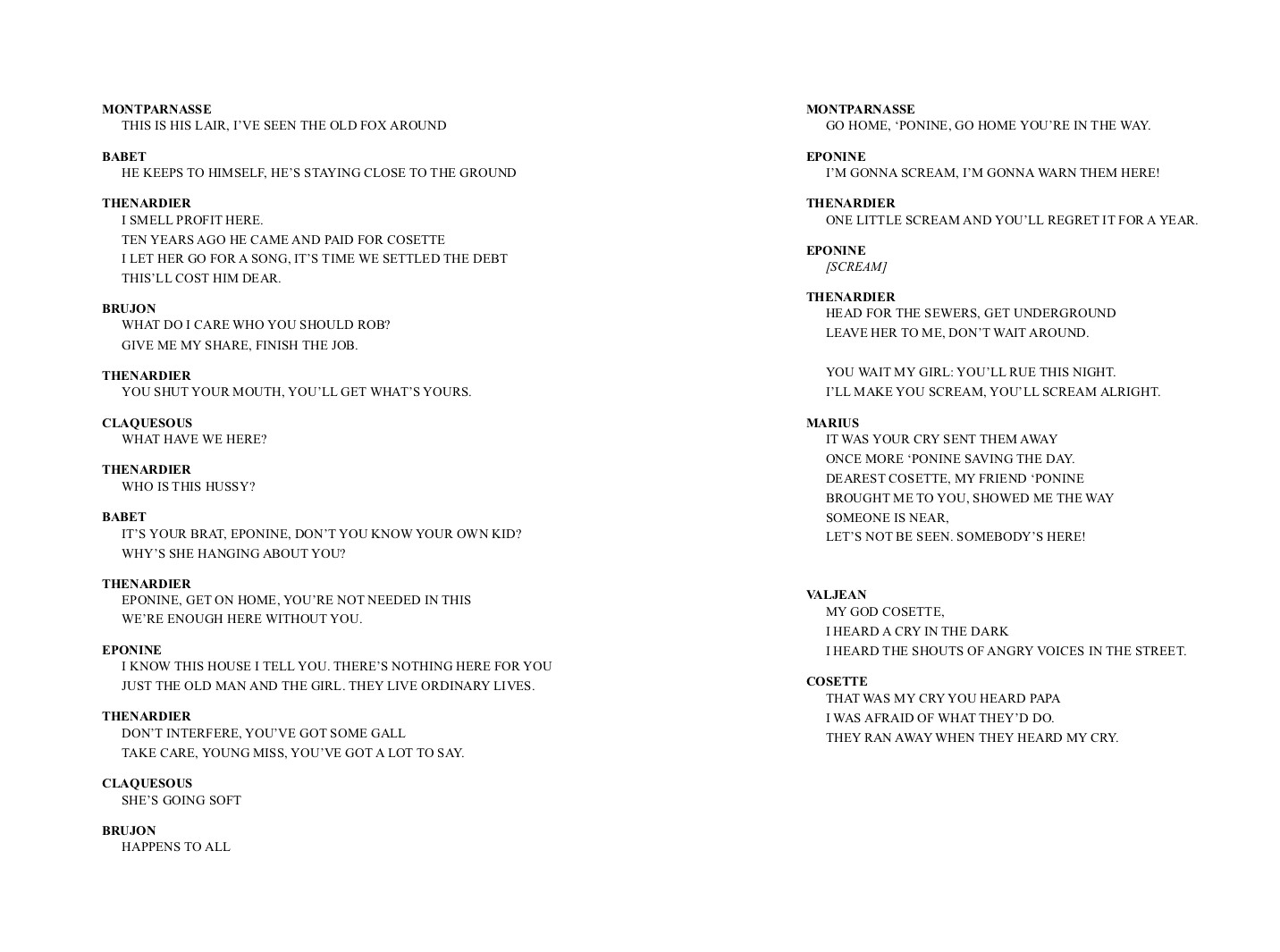
As an example, let’s say we have 8 faders for dialogue and take a look at “The Attack on Rue Plumet” from Les Mis (if you want to listen along, it’s the dialogue from the 2010 Cast album for the 25th Anniversary production):
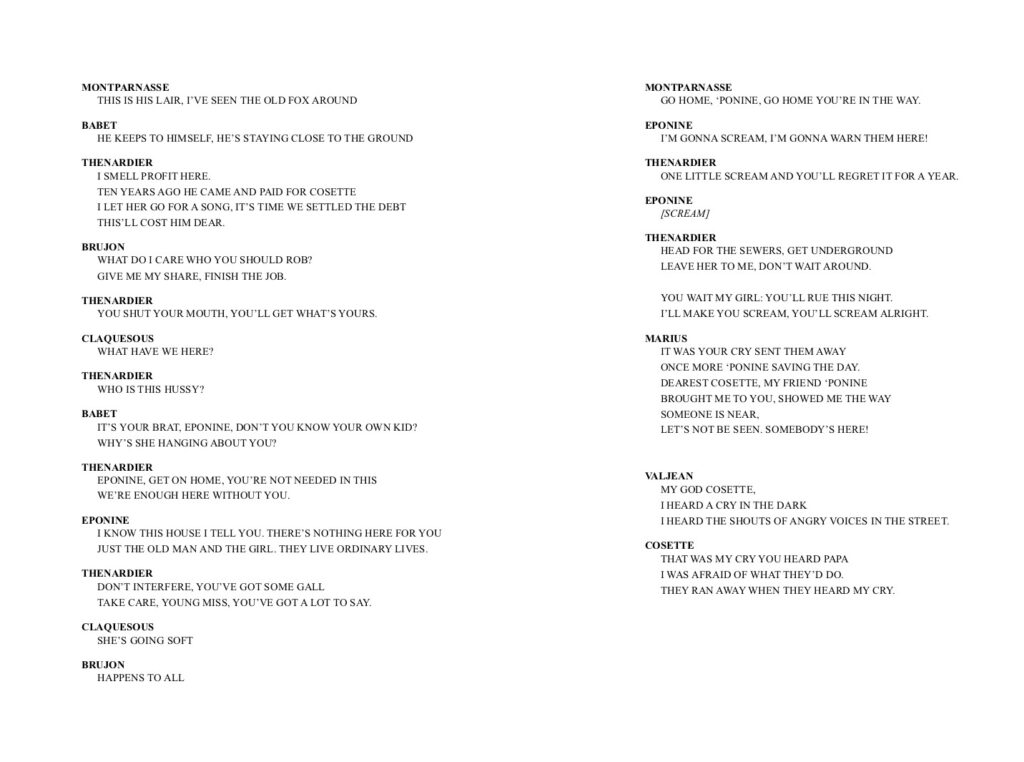
 

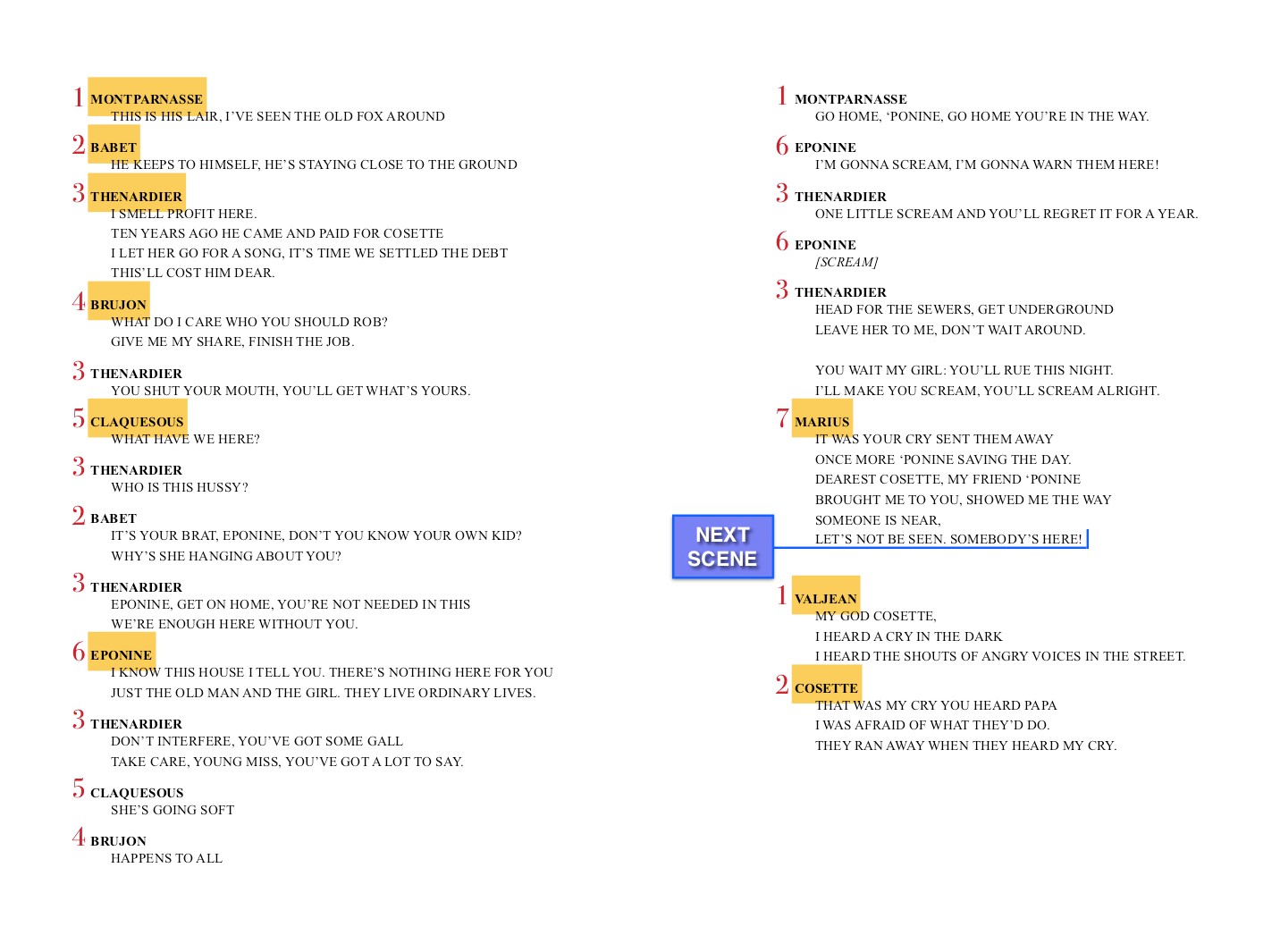
A typewriter approach to mixing would assign DCAs in increasing order each time a new character speaks (first lines are highlighted):
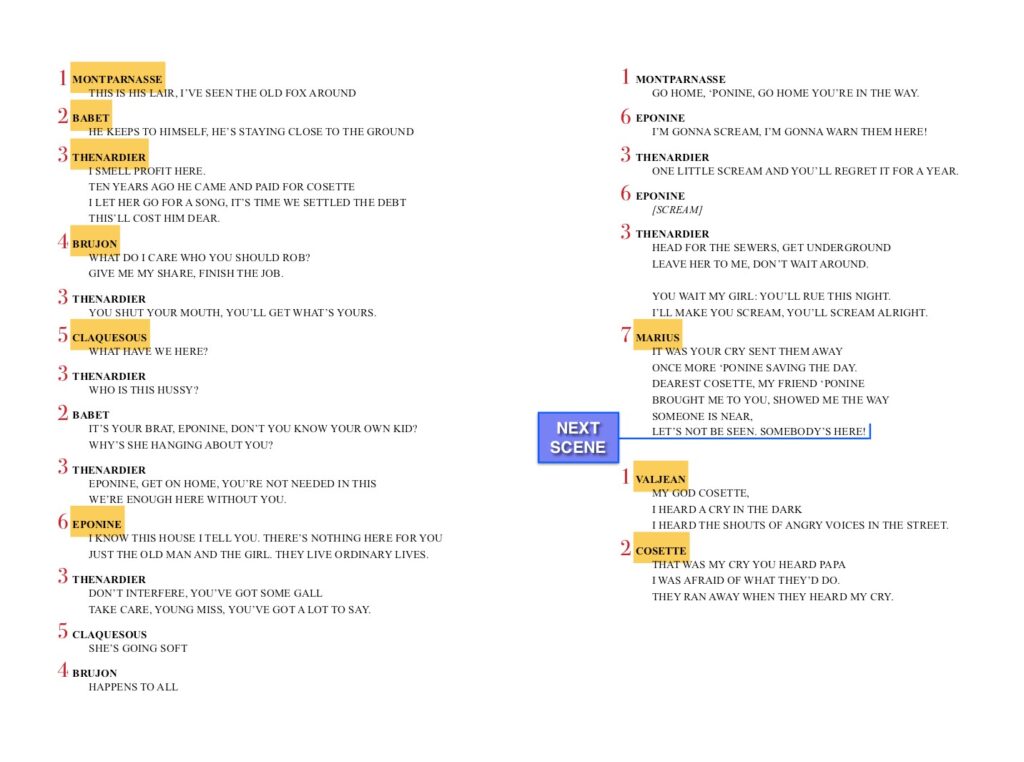
By the time we get to Marius, we’re almost out of faders, and there’s a natural change in the scene when Thenardier’s gang runs off and Valjean enters, so it works to take a cue between those two lines and start over with the DCAs.

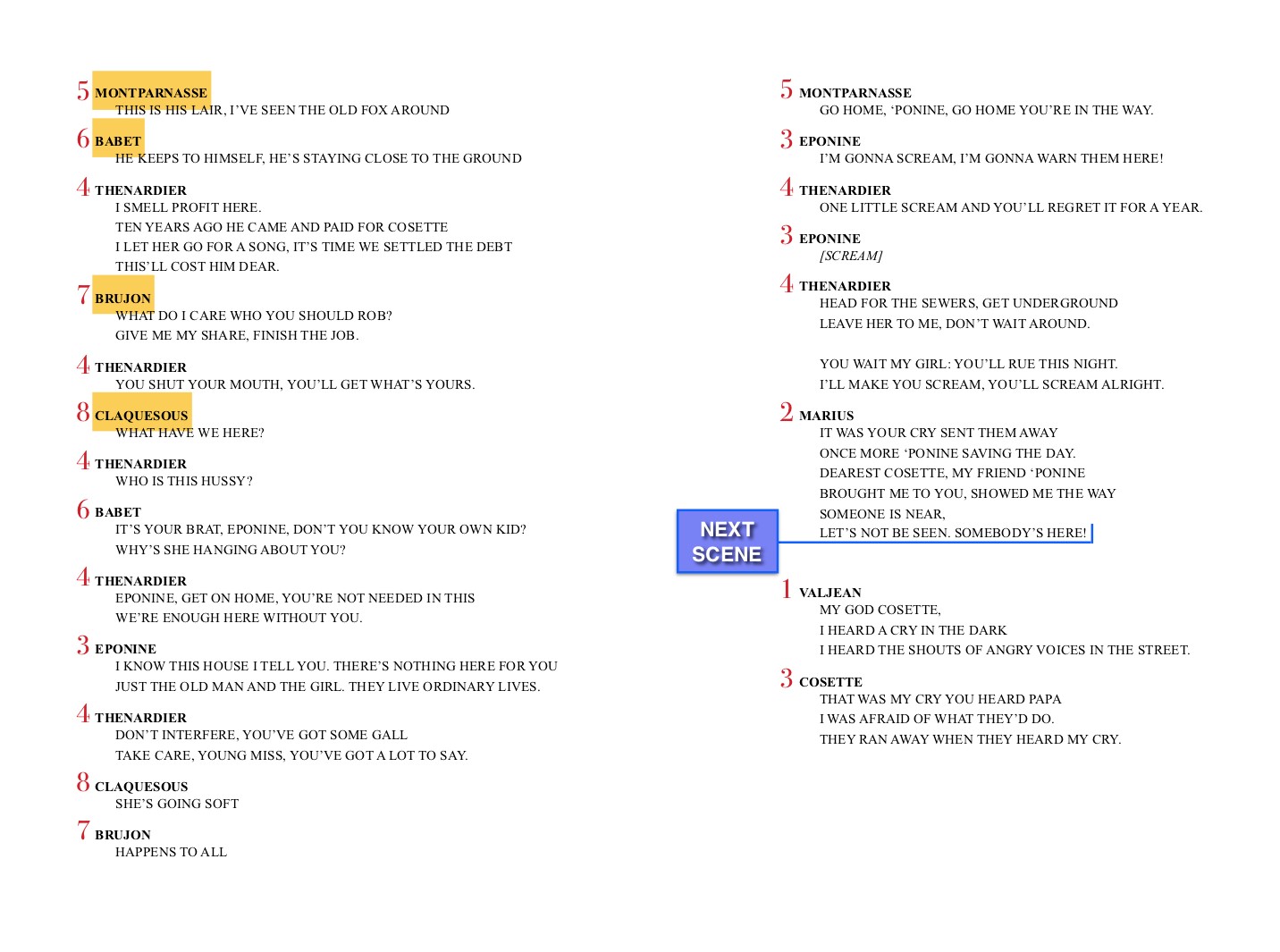
But Les Mis is an ensemble show that’s centered around a core group of principals, so assigning characters to designated fader numbers is another option. If we’re mapping out the entire show, we find that Valjean, as the protagonist, ends up on (1), Marius, the main love interest, on (2),  and Cosette and Eponine can alternate on (3) as they interact with Marius most frequently, but usually aren’t in scenes together. Thenardier could go a couple of places: he leads in scenes like “Master of the House” and “Dog Eats Dog,” but in scenes with the other principals, he typically takes a secondary role, so we’ll put him on (4) in this scene. The chorus parts, Montparnasse, Claquesous, Brujon, and Babet (first lines are still highlighted below), are easiest to put in typewriter style after Thenardier since they only appear once or twice in the show, so don’t have a designated fader number.

The mix script for this approach would look like this:
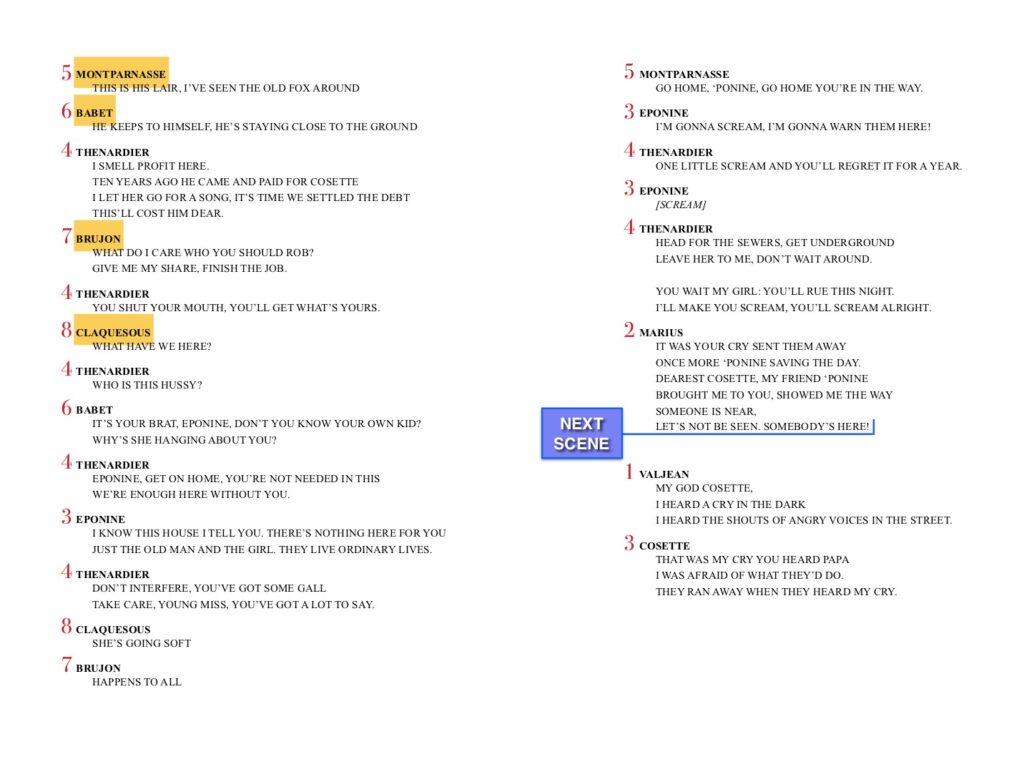
 

Here, Thenardier (4) is still right next to his cronies (5), (6), (7), and (8), but is also right next to Eponine (3) for their bits of back-and-forth. The scene change still ends up after Marius’s line, as it’s a natural place to take it, and Cosette replaces Eponine on (3), getting ready for the next scene “One Day More,” where Marius (2) and Cosette (3) will be singing a duet, with Eponine (4) separated, singing her own part.

With this particular scene, neither approach is perfect, as all the characters have multiple lines (and not in the same order every time), but either one would be a legitimate way to set it up.

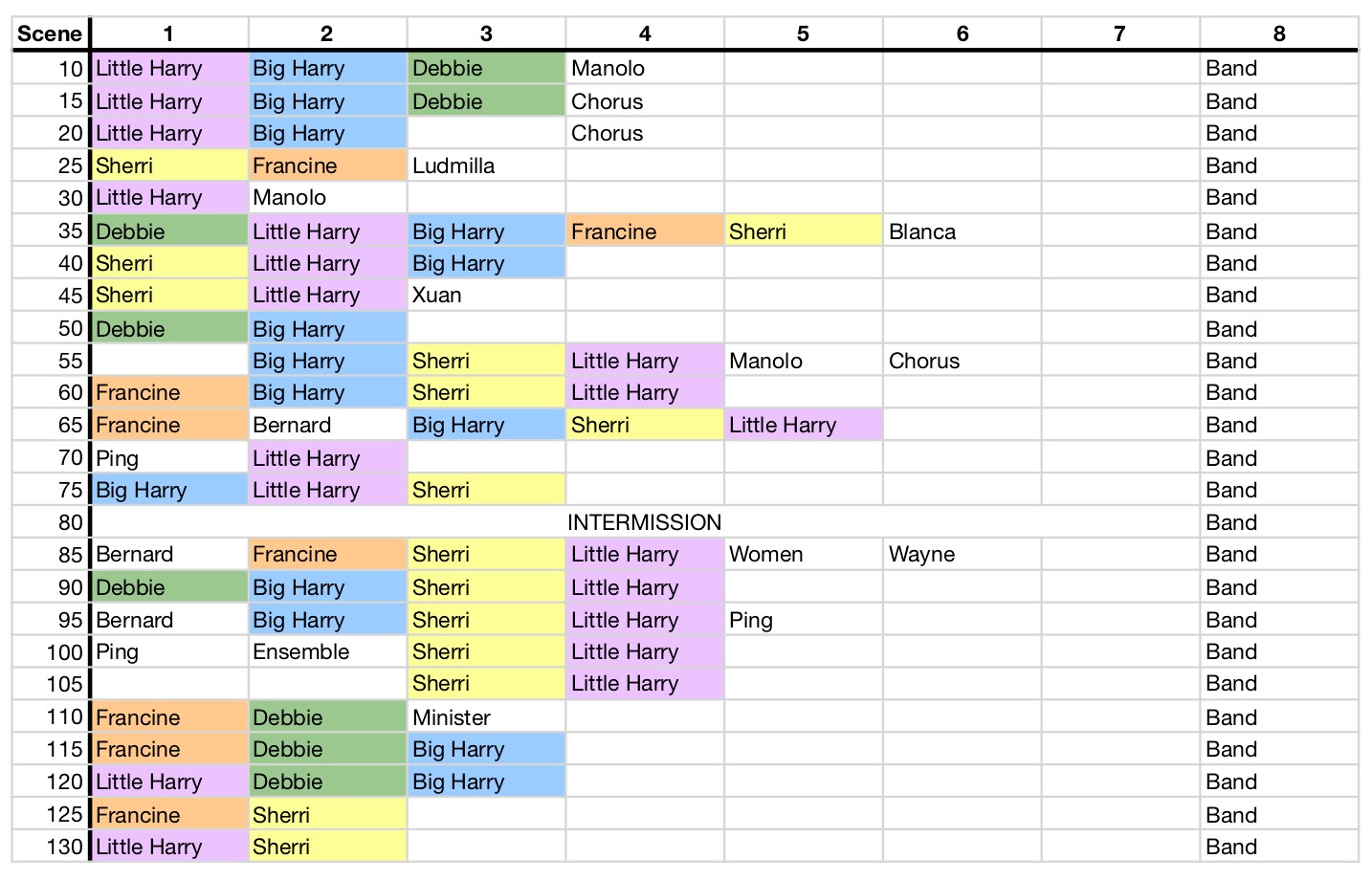
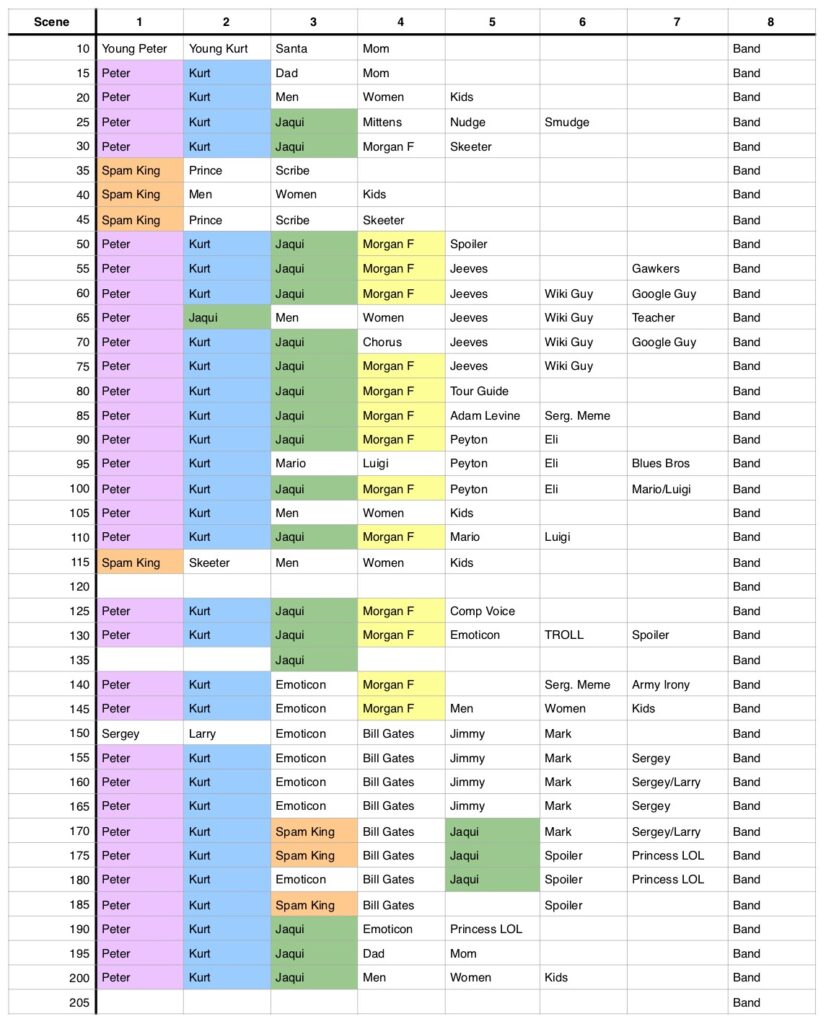
Typically, you’ll use a combination of both approaches over the course of a show, with one that you default to for scenes that could go either way, like the example. Personally, I like to use a spreadsheet where I can see the entire show and get an overview of what the mix will look like. This makes it easier to spot patterns or adjust potentially awkward changes in assignments. (The colors for major characters in the examples are just visual aids that I added for this blog.)

For example, here’s a layout that’s mostly typewriter. Characters may stay on the same fader for connected scenes, but overall the assignments go in order of lines in a scene:
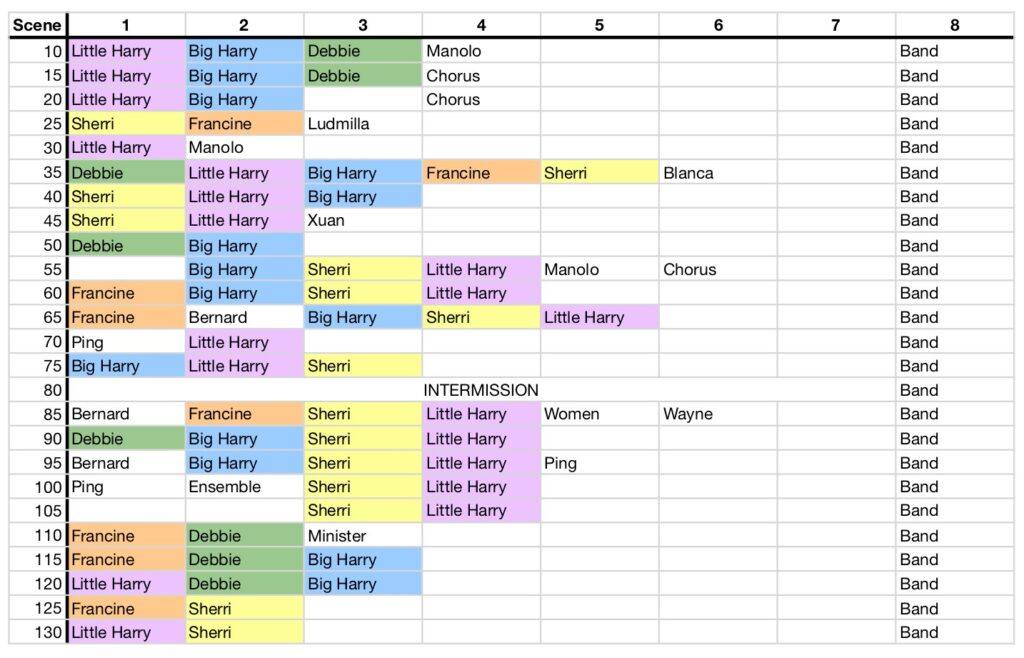
 

As another example, there is a core group of four actors that are in almost the entire show and a couple of reoccurring supporting roles, so using a designated fader for those characters works much better. There are times that the pattern breaks for a scene or two to switch to typewriter, but largely everyone stays in the same place:
 

Once you have the DCAs planned out, you can start to format a mixing script. The first example from Les Misérables gives a basic version of that: putting numbers next to lines for the DCA assignments, notes for where cues will go, but you will also eventually add in-band moves, effect levels, and other notes.

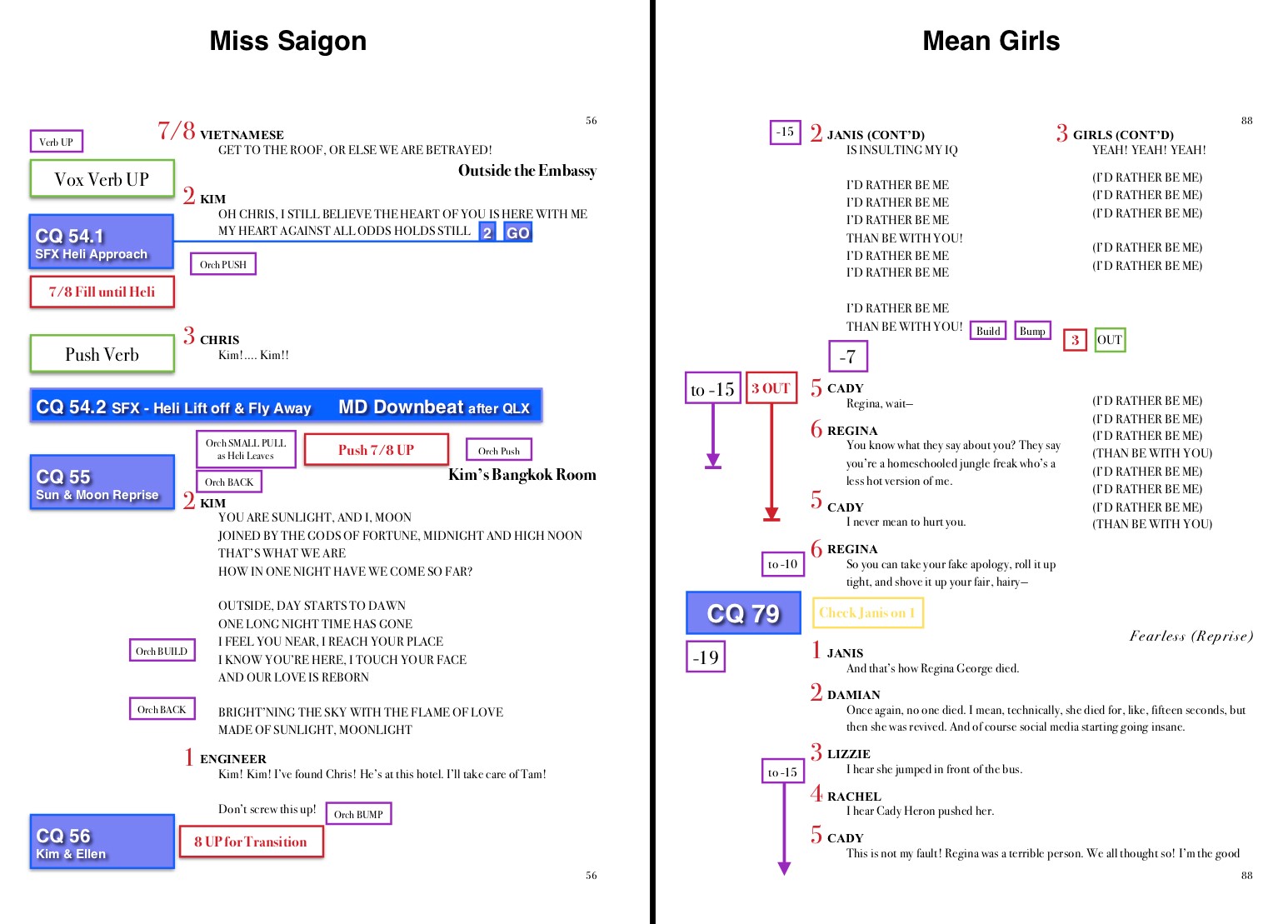
Personally, I like the majority of my information to be in the left margin, and if I have enough time I’ll retype the script into my own format so I can mess with it as much as I want. My scripts look like this (I thoroughly enjoy color coding!):
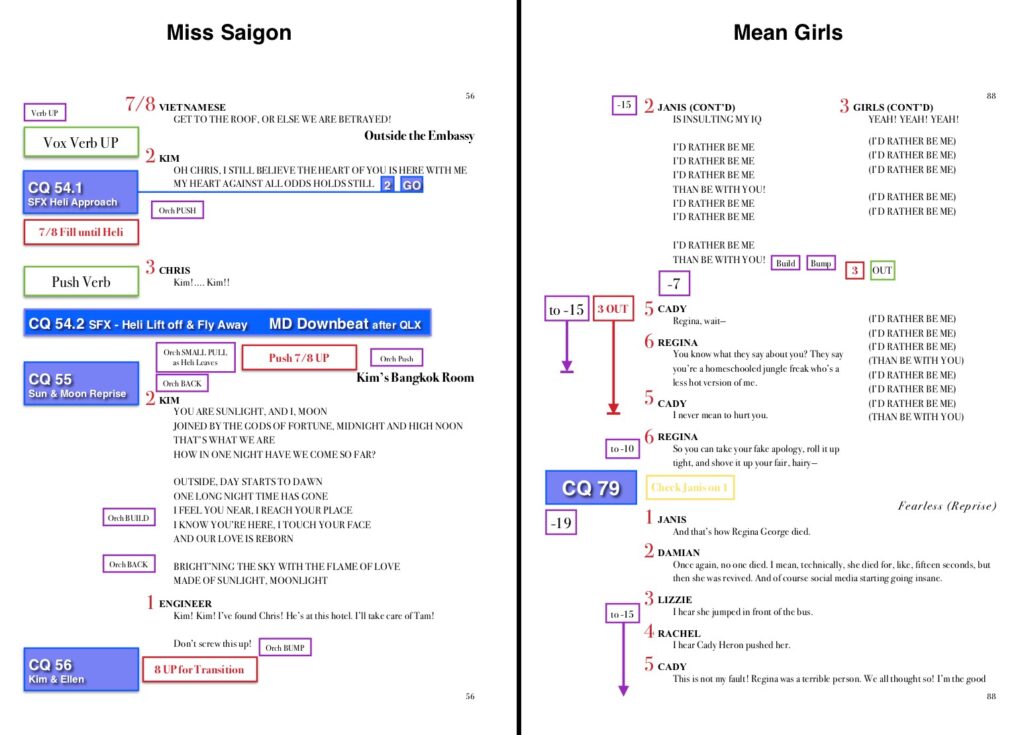
 

Each show might have slight differences, but the broad strokes are always the same: cues are in lavender boxes with a blue border (for cues taken off a cue light, the colors are inverted, so blue box with lavender border), band moves are in purple, vocal verb is green, red are mic notes as well as DCA numbers, and yellow is anything that I need to pay attention to or should check.

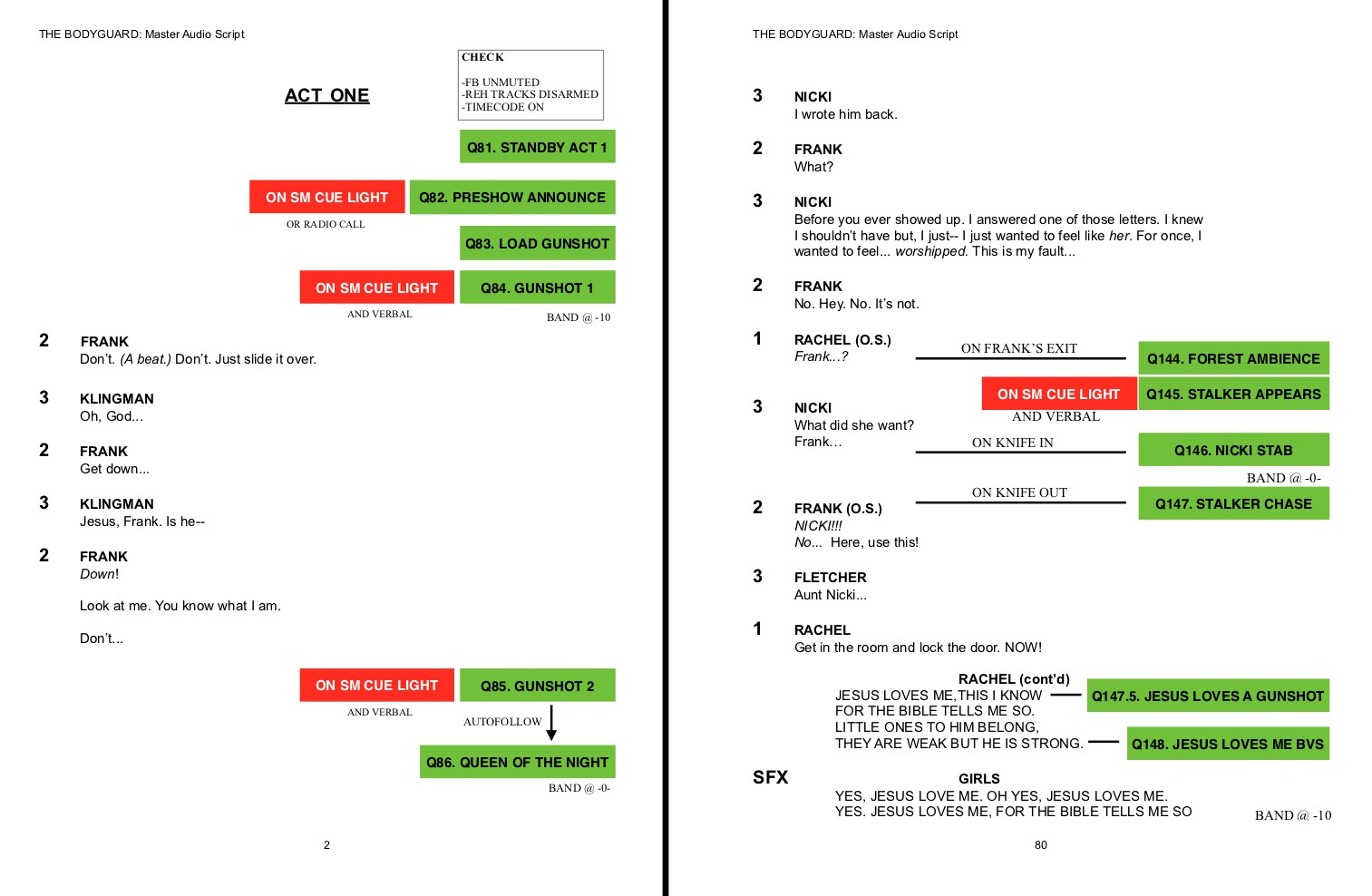
Here’s another example and an explanation from Allison Ebling from her script for The Bodyguard tour (she’s currently the Head Audio on the 1st National Tour of Anastasia):
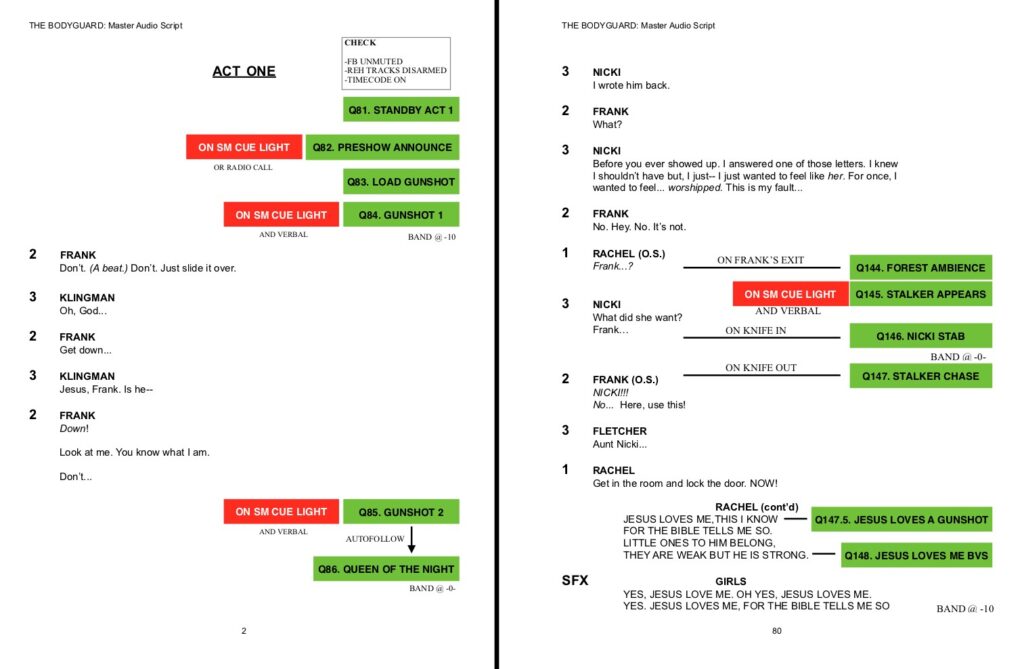
 

“One is the top of show sequence which had to be verbally called and on Qlite due to the fact that it was a bit jarring for audiences. (LOUD gunshots and all the lights went off without warning, our preshow announce was played at the scheduled start and downbeat was 5 [minutes] after.) 

The other is a sequence in the second act where I took one cue with the SM, and the rest were on visual. It also has my favorite Q name ever… ‘Jesus Loves a Gunshot.’

I also like reading my script left to right, so I usually end up reformatting them that way.”

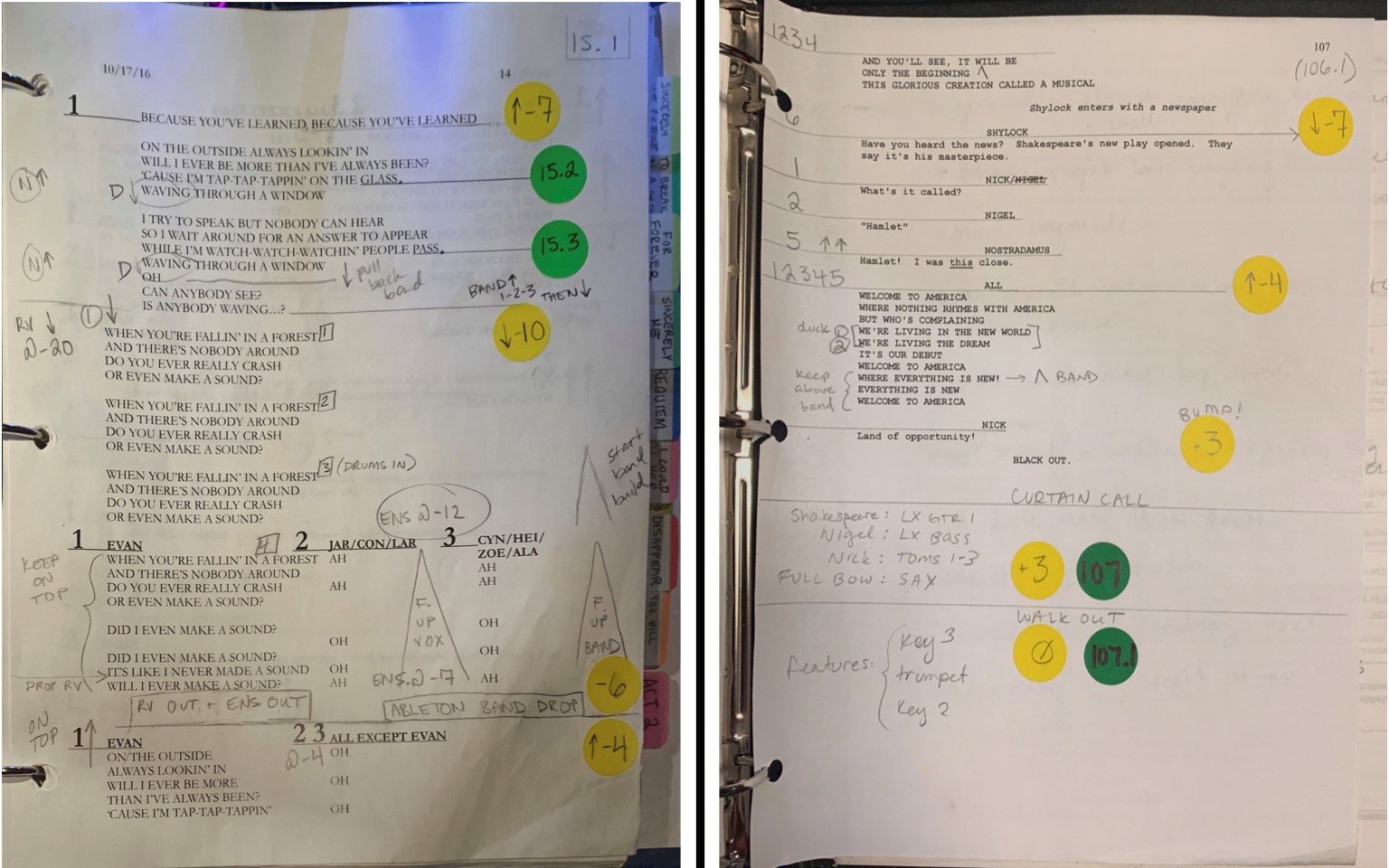
And another example and explanation from Mackenzie Ellis (currently the Head Audio on the 1st National Tour of Dear Evan Hansen):
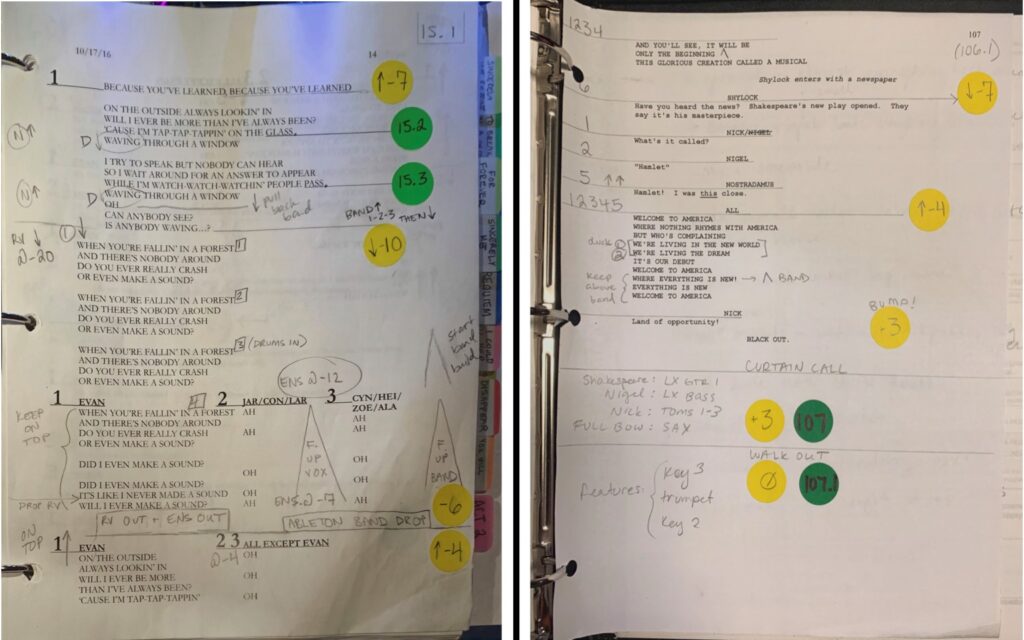
“Here are some from my DEH tour script [Left], and some from the Something Rotten [Right] first national tour, both of which I am/was the A1 for. Both scripts were adapted from the Broadway versions, created by Jarrett Krauss and Cassy Givens, respectively. 

Notes on my formatting:


As you can see, there are different styles and endless ways to customize a mixing script. How you arrange or put notations in your script is purely a personal preference, and will constantly evolve as you continue to work on shows. As a note: not only should you be able to read your script, but to be truly functional, it should be clear enough that an emergency cover can execute a passable show in a pinch.

At this point, you have your script ready and a solid plan for how the show will run. If there’s still time before tech, you can start practicing. Practice boards are becoming more and more popular and are incredibly helpful to work out the choreography of a mix. Casecraft makes one that is modeled after the DiGiCo SD7 fader bank. Scott Kuker (most recently the mixer for Be More Chill on Broadway) made a custom, travel-size board for me a couple of years ago that I absolutely love. It immediately became an integral part of learning the mix for both me and my assistants!

I highly recommend getting one if you’re career plans involve mixing theatrical shows, but if you don’t have one, there’s the tried and true option of setting up coins to push as makeshift faders (pennies tend to be a good size, but some prefer quarters). Whatever method you use, the point is to start getting a sense of muscle memory and timing as you work through the show. It also gives you an opportunity to work through complicated or quick scenes, so you get a feel for the choreography or can even look at adjusting the DCA programming to make it easier.

After prepping a script and getting in some practice, walking up to the console in tech doesn’t seem as daunting. If you’re well prepared, you’re able to keep up and adapt to changes faster. Plus, if you’re self-sufficient at the board, your designers can trust you to mix the show and take more time to focus on their job of getting the system and the show the way they want it, which will help you in the long run.

 

General Services

American Express https://www.americanexpress.com/
Apple https://www.apple.com/apple-card/
AT&T https://about.att.com/pages/COVID-19.html
Bank of America https://about.bankofamerica.com/promo/assistance/latest-updates-from-bank-of-america-coronavirus?cm_sp=EBZ-BAC-Announcement-_-NotAssigned-_-AMT2HX5P00_Engagement_Banner_COVID19_Consumer_JCRLink
Bank of NY Mellon https://www.bnymellon.com/
Barclays https://home.barclays/news/2020/03/supporting-our-customers-and-clients-impacted-by-coronavirus–co/
Buick, GMC https://www.gmc.com/here-to-help?evar25=gm_com_covid
Capital One https://www.capitalone.com/coronavirus/
Chase https://www.chase.com/
Chevrolet https://www.chevrolet.com/chevy-cares-were-open
Citibank https://online.citi.com/US/JRS/pands/detail.do?ID=covid19
Discover https://www.discover.com/
Farmers Insurance https://www.farmers.com/covid-19-notice/
Ford https://www.ford.com/finance
Geico https://www.geico.com/about/coronavirus/
Government Financial Assistance After a Disaster https://www.usa.gov/disaster-financial-help
Hyundai https://www.hyundaiusa.com/us/en/special-programs/hyundai-assurance
PNC https://www.pnc.com/en/customer-service/coronavirus-update.html?lnksrc=homepage-alert
Progressive https://www.progressive.com/support/covid19/
State Farm https://www.statefarm.com/
State Street https://www.statestreetbank.com/covid-19-update
TD Bank https://www.td.com/us/en/personal-banking/COVID-19/
T-Mobile https://www.t-mobile.com/brand/ongoing-updates-covid-19?icid=MGPO_TMO_P_CUSTSUPT_K49SR0SE1EB2Z9F6E20091_HP
Toyota https://www.toyota.com/
US Bank https://www.usbank.com/splash/covid-19.html
USAA https://communities.usaa.com/t5/USAA-News/How-USAA-is-Responding-to-Concerns-about-Coronavirus-COVID-19/ba-p/226066
Verizon https://www.verizon.com/about/news/our-response-coronavirus
Wells Fargo https://www.wellsfargo.com/jump/enterprise/coronavirus-response

Utilities State by State

State Power, Gas, Water

Alabama

Alabama Power https://www.alabamapower.com/ 888-430-5787 Spire Energy https://www.spireenergy.com/ 800-292-4008

Alaska

AP&T https://www.aptalaska.com/ Check website for your area Enstar https://www.enstarnaturalgas.com/ Check website for your area

Anchorage Water and Wastewater Utility https://www.awwu.biz/ (907) 564-2700
Alaska AEL&P https://www.aelp.com/ 907-780-2222

Arizona

APS https://www.aps.com/en/residential/home 800-253-9405)

Southwest Gas https://www.swgas.com/ 877-860-6020

Arizona Water Company http://www.azwater.com/ 602.240.6860

Arkansas

Entergy Arkansas https://www.entergy-arkansas.com/residential/ 800-368-3749 Centerpoint Energy https://www.centerpointenergy.com/en-us/pages/selfid.aspx 800-992-7552

California
Colorado
Connecticut
Delaware
Florida
Georgia
Hawaii
Hilo
Kauai
Kona
Mauai
Oahu
Idaho
Illinois

Indiana

Centerpoint Energy https://www.centerpointenergy.com/en-us/pages/selfid.aspx

Iowa
Kansas
Kentucky

Louisiana

Centerpoint Energy https://www.centerpointenergy.com/en-us/pages/selfid.aspx

Maine
Maryland
Massachusetts
Michigan

Minnesota

Centerpoint Energy https://www.centerpointenergy.com/en-us/pages/selfid.aspx

Mississippi

Power https://www.mississippipower.com/ 800-532-1502

Spire Energy https://www.spireenergy.com/ 877-945-5427
Centerpoint Energy https://www.centerpointenergy.com/en-us/pages/selfid.aspx

Missouri

Spire Energy https://www.spireenergy.com/ E. 800-887-4173, W. 800-582-1234

Montana
Nebraska

Nevada

Nevada Energy https://www.nvenergy.com/ (702) 402-5555

Southwest Gas https://www.swgas.com/ 877-860-6020

Las Vegas Valley Water https://www.lvvwd.com/ 702) 870-4194

New Hampshire
New Jersey
New Mexico
New York
North Carolina
North Dakota

Ohio

Centerpoint Energy https://www.centerpointenergy.com/en-us/pages/selfid.aspx

Oklahoma

Centerpoint Energy https://www.centerpointenergy.com/en-us/pages/selfid.aspx

Oregon
Pennsylvania
Rhose Island
South Carolina
South Dakota
Tennessee

Texas 

South Centerpoint Energy https://www.centerpointenergy.com/en-us/pages/selfid.aspx Beaumont 800-376-9663, E 800-259-5544, S 800-427-7142
Texas – Houston Centerpoint Energy https://www.centerpointenergy.com/en-us/pages/selfid.aspx 800-752-8036

Utah
Vermont
Virginia
Washington
West Virginia
Wisconsin
Wyoming

Unemployment State by State


Alabama 866-234-5382 https://labor.alabama.gov/unemployment.aspx
Alaska (907) 269-4700 https://labor.alaska.gov/unemployment/
Arizona (877) 600-2722 https://des.az.gov/services/employment/unemployment-individual
Arkansas 855-225-4440 https://www.dws.arkansas.gov/unemployment/
California 800-300-5616 https://edd.ca.gov/claims.htmq
Colorado 800-388-5515 https://myui.coworkforce.com/Welcome
Connecticut 860) 263-6000 http://www.ctdol.state.ct.us/UI-online/index.htm
Delaware (302) 368-6600 https://ui.delawareworks.com/
Florida 800-204-2418 https://www.stateofflorida.com/articles/florida-unemployment/
Georgia 404-232-3180 https://dol.georgia.gov/unemployment-benefits
Hawaii https://labor.hawaii.gov/ui/
Hilo (808) 974-4086 dlir.ui.hilo@hawaii.gov
Kauai (808) 274-3043 dlir.ui.kauai@hawaii.gov
Kona (808) 322-4822 dlir.ui.kona@hawaii.gov
Mauai (808) 984-8400 dlir.ui.maui@hawaii.gov
Oahu (808) 586-8970 dlir.ui.oahu@hawaii.gov
Idaho (208) 332-8942 https://www.labor.idaho.gov/dnn/Unemployment-Benefits
Illinois (800) 244-5631 http://www.ides.illinois.gov/SitePages/ContactIDES.aspx
Iowa 866-239-0843 https://www.iowaworkforcedevelopment.gov/file-claim-unemployment-insurance-benefits
Kansas (800) 292-6333 https://www.getkansasbenefits.gov/Home.aspx
Indiana 800-457-8283 https://www.in.gov/dwd/2362.htm
Kentucky 502-875-0442 https://uiclaims.des.ky.gov/ebenefit/eben.htm
Louisiana (225) 342-3111 http://www.laworks.net/UnemploymentInsurance/UI_MainMenu.asp
Maine 800-593-7660 https://www.maine.gov/labor/unemployment/claims.shtml
Maryland 410-853-1600 https://www.dllr.state.md.us/employment/unemployment.shtml
Massachusetts 617-626-6800 https://www.mass.gov/unemployment-insurance-ui-online
Michigan 866-500-0017 https://www.michigan.gov/leo/0,5863,7-336-78421_97241—,00.html
Minnesota 877-898-9090 https://www.uimn.org/applicants/index.jsp
Mississippi 601-321-6000 https://mdes.ms.gov/unemployment-claims/filing-ui-claims-online/
Missouri 800-735-2966 https://labor.mo.gov/unemployed-workers
Montana (406) 444-2545 9 http://uid.dli.mt.gov/
Nebraska 402-458-2500 https://www.dol.nebraska.gov/UIBenefits
Nevada 702-486-0350 http://ui.nv.gov
New Hampshire 800-852-3400 https://www.nhes.nh.gov/
New Jersey 201-601-4100 https://myunemployment.nj.gov/
New Mexico 877-664-6984 https://www.dws.state.nm.us/en-us/Unemployment
New York (888) 209-8124 https://labor.ny.gov/unemploymentassistance.shtm
North Carolina (919) 814-4600 https://www.nccommerce.com/jobs-training/resources-job-seekers/file-unemployment-insurance
North Dakota (701) 328-4995 https://apps.nd.gov/jsnd/uiiaclaims/login.htm
Ohio 877-644-6562 https://unemployment.ohio.gov/
Oklahoma 800.555.1554 https://unemployment.state.ok.us/
Oregon 800-237-3710 https://www.oregon.gov/employ/unemployment/pages/default.aspx
Pennsylvania 888.313.7284 https://www.uc.pa.gov/unemployment-benefits
Rhose Island 401-243-9100 http://www.dlt.ri.gov/ui/
South Carolina 803-737-2400 https://dew.sc.gov/employers/ui-benefits
South Dakota 605-626-2452 https://www.benefits.gov/benefit/1810
Tennessee 844-224-5818 https://www.tn.gov/workforce/unemployment.html
Texas 800-939-6631 https://twc.texas.gov/jobseekers/unemployment-benefits-services
Utah 801-526-4400 https://jobs.utah.gov/ui/home
Vermont 877-214-3330 https://labor.vermont.gov/unemployment-insurance
Virginia 866-832-2363 http://www.vec.virginia.gov/unemployed
Washington 800-318-6022 https://esd.wa.gov/unemployment
West Virginia 800-252-5627 https://workforcewv.org/unemployment
Wisconsin (608) 266-3131 https://dwd.wisconsin.gov/ui/
Wyoming (307) 473-3789 http://wyomingworkforce.org/workers/ui/

Mental Health & Self Care Resources

SoundGirls Self-Care: Coping with Anxiety

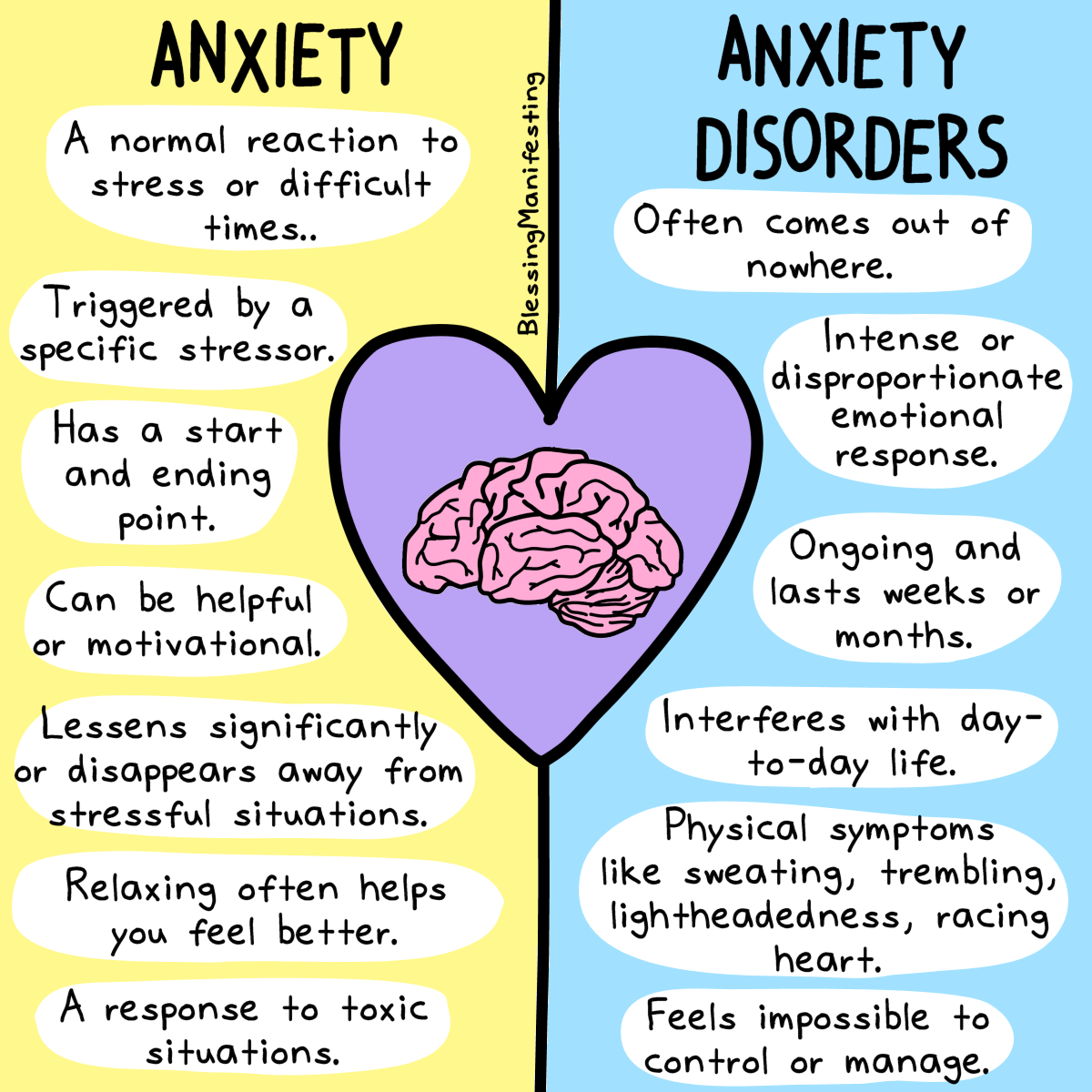
What is anxiety? “Anxiety is a normal and often healthy emotion. However, when a person regularly feels disproportionate levels of anxiety, it might become a medical disorder. Anxiety disorders form a category of mental health diagnoses that lead to excessive nervousness, fear, apprehension, and worry.” 1

Working in the Entertainment Industry can be stressful at times. During the past few weeks alone due to COVID-19, festivals, concerts, tours, and corporate gigs were canceled. This aftermath created a lot of fear and anxiety not only in our work industry but many others as well.

As someone who deals with anxiety and mental health, I think it is very important for Mental Health Awareness to be brought into light during this difficult time for many. In this article, I will discuss coping skills for anxiety that are worth sharing.

Take a Time Out 

With everything going on in the news it’s a good time to take time out and learn Mindfulness.

Mindfulness is “ the process of purposely bringing one’s attention to experiences occurring in the present moment without judgment, which one develops through the practice of meditation and through other training” Turn off your phone. Go for a walk. Listen to music. Practice Yoga. 2

Exercise your Mindfulness skills.

Accept That You Cannot Control Everything 

Anxiety mostly stems from worrying about things we cannot control. We are powerless over things we cannot control. What we are in control of though, are our emotions and reactions. This is a great time to learn how to channel negative emotions and problems into positive thoughts and solutions.

Reach Out 

Whenever we are feeling down and out, it is best to reach out. Talking about your feelings with others is a great way to express yourself. I am thankful for the SoundGirls Facebook Group!

There are so many people sharing resources and being an outlet for one another during this hard time.

Anxiety is a normal emotion, but it cannot define us and take over our lives. We must learn how to cope with negative emotions and thoughts. This isn’t a process that can happen overnight, but with hard work, discipline, and coping skills we can all overcome our fears and anxiety.

1 Felman, A. (2020, January 11). Anxiety: Overview, symptoms, causes, and treatments. Retrieved from https://www.medicalnewstoday.com/articles/323454 2 Felman, A. (2020, January 11). Anxiety: Overview, symptoms, causes, and treatments. Retrieved from https://www.medicalnewstoday.com/articles/323454

X